
ERROR (horror) Minecraft bedrock edition
Creator: Sergey7363635 · 2026-09-14 · Mods · Free on Eaglercraft Studio
Download ERROR (horror) Minecraft bedrock edition — free Minecraft mod. Created by Sergey7363635. Tagged creepy, entity, horror, new content. Check the file details for Forge, Fabric, or NeoForge before installing.
Creator notes
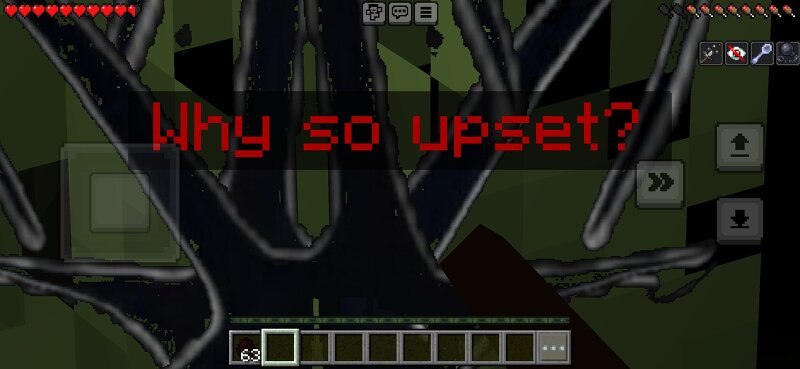
ERROR A mysterious glitched entity that appears far from the player... and never stops hunting. Features:• Billboard-style model (always faces the player)• Spawns at a distance and aggressively chases the player• Periodically writes "ERROR/syntax" in chat• Special death cutscene when it gets close and kills you• Custom spawn egg• Works in Survival Death Cutscene text:Why so upset?Life is precious.Every new day you live throughIs a gift from God,Cherish it.Because one day,Your life may end.Like this poor fellowYou understand?Beautiful How to use:1. Import the .mcaddon2. Activate both Behavior Pack and Resource Pack3. Create a new world or add to existing one4. Find the ERROR spawn egg in creative inventory or wait for it to spawn naturally at night Warning: This is a horror addon. Play with headphones for maximum effect. Created for Minecraft Bedrock Edition.
Added value
What’s included on this page
Preview, categories, compatibility, and tools on this page — not a bare file mirror.
- Creator
- Sergey7363635
- Source
- Minecraft downloads library on Eaglercraft Studio
- Type
- Minecraft mod
- Price
- Free download on Eaglercraft Studio
- Curation
- Listed with credit to Sergey7363635 · studio preview & install guide
- Game Version
- Minecraft 26.3 snapshot
- Compatible with
- Minecraft Java (match version / loader in facts)
- Tags
- Creepy, Entity, Horror, New Content
Install guide
How to install this free Minecraft mod
Eaglercraft Studio listing with metadata, creator credit, and loader-aware install guidance.
- 1Download the jar/zip when available.
- 2Install the matching loader (Forge, Fabric, or NeoForge) for your Minecraft version.
- 3Drop the mod into your mods folder, then launch with that profile.
Wrong loader or game version usually crashes on startup — read the facts on this page first.
Related free mods
More curated mods from the same library section.

Pastelmooncrafting15 · 67 diamonds · 20 views

PotatoWolfie · 60 diamonds · 2 views

PotatoWolfie · 53 diamonds · 622 views

Janss_33PL · 47 diamonds · 940 views