
EzRTP
Creator: ez-plugins · 2026-05-11 · Mods · Free on Eaglercraft Studio
Download EzRTP — free Minecraft mod. Created by ez-plugins. Tagged bukkit, plugin, rtp, server. Check the file details for Forge, Fabric, or NeoForge before installing.
Creator notes
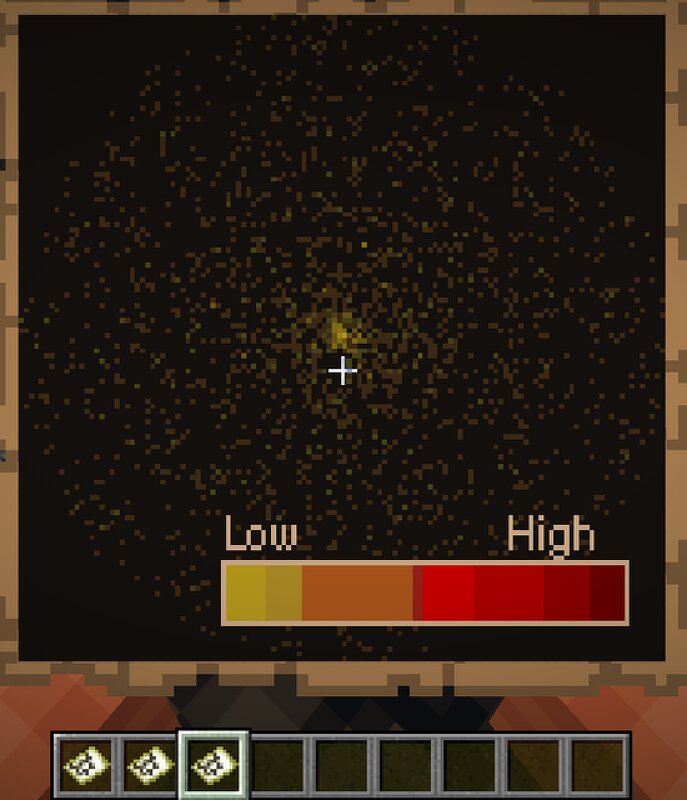
EzRTP - Advanced Random Teleport Plugin Production-ready random teleport plugin for modern Minecraft servers Latest release and docs: https://github.com/ez-plugins/EzRTP • Java 17+ • Bukkit/Paper/Spigot/Purpur/Folia support Modrinth • SpigotMC • Hangar • Discord Feature Summary Safe RTP with configurable unsafe-block filtering and recovery behavior Biome include/exclude filtering, pre-cache, and rare-biome optimization Search pattern control: random, circle, square, triangle, diamond Per-world/per-group cooldowns, daily/weekly limits, and optional costs GUI destination selector with permission-gated entries Heatmap generation and PNG export Named centers and WorldGuard region command routing Optional Chunky pre-generation support Optional performance and unsafe-location monitoring exports Folia-compatible runtime behavior for modern scheduler environments Feature Preview Biome Statistics Dashboard Heatmap Visualization World Selector GUI Commands and Subcommands Main Commands Command Description Permission /rtp Default RTP flow (GUI or direct teleport depending on setup) ezrtp.use /forcertp <player> [world] Force RTP for a target player ezrtp.forcertp /rtp Subcommands Subcommand U
Added value
What’s included on this page
Preview, categories, compatibility, and tools on this page — not a bare file mirror.
- Creator
- ez-plugins
- Source
- Minecraft downloads library on Eaglercraft Studio
- Type
- Minecraft mod
- Price
- Free download on Eaglercraft Studio
- Curation
- Listed with credit to ez-plugins · studio preview & install guide
- Game Version
- Minecraft 26.1.1
- Compatible with
- Minecraft Java (match version / loader in facts)
- Tags
- Bukkit, Plugin, Rtp, Server
Install guide
How to install this free Minecraft mod
Eaglercraft Studio listing with metadata, creator credit, and loader-aware install guidance.
- 1Download the jar/zip when available.
- 2Install the matching loader (Forge, Fabric, or NeoForge) for your Minecraft version.
- 3Drop the mod into your mods folder, then launch with that profile.
Wrong loader or game version usually crashes on startup — read the facts on this page first.
Related free mods
More curated mods from the same library section.

Pastelmooncrafting15 · 67 diamonds · 20 views

PotatoWolfie · 60 diamonds · 2 views

PotatoWolfie · 53 diamonds · 622 views

Janss_33PL · 47 diamonds · 940 views