
F34
Creator: magbFox · 2026-07-19 · Mods · Free on Eaglercraft Studio
Download F34 — free Minecraft mod. Created by magbFox. Tagged functional. Check the file details for Forge, Fabric, or NeoForge before installing.
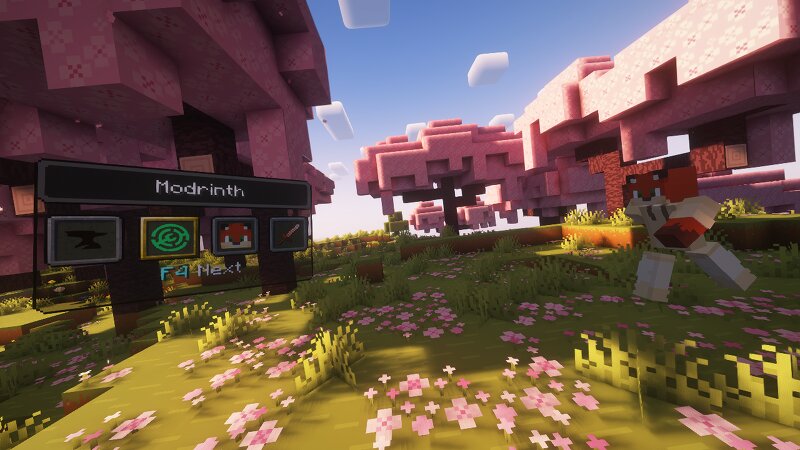
Creator notes
F34 F34 is a customizable in-game action switcher for Minecraft Java Edition. Create your own switcher windows, organize buttons into multiple instances, and execute commands or client-side actions without interrupting your gameplay. Whether you frequently change game modes, run long commands, connect several commands together, leave a server, or use custom addon actions, F34 lets you access them through a compact and fully configurable interface. Features Custom switcher instances Create multiple independent switcher instances for different situations, such as: Creative tools Survival utilities Server commands Building tools Teleport shortcuts Minigame controls Custom addon actions Each instance can have its own name, icon, buttons, enabled state, and layout. Commands and action chains A single button can execute one or multiple actions in order. Supported command modes include: Normal commands Chain commands Repeating commands Conditional commands Multi-line command input Command autocomplete F34 follows normal Minecraft permission rules. Commands that require operator permissions are disabled when the player does not have permission. Client-side actions Buttons can also perform
Added value
What’s included on this page
Preview, categories, compatibility, and tools on this page — not a bare file mirror.
- Creator
- magbFox
- Source
- Minecraft downloads library on Eaglercraft Studio
- Type
- Minecraft mod
- Price
- Free download on Eaglercraft Studio
- Curation
- Listed with credit to magbFox · studio preview & install guide
- Game Version
- Minecraft 26.2
- Compatible with
- Minecraft Java (match version / loader in facts)
- Tags
- Functional
Install guide
How to install this free Minecraft mod
Eaglercraft Studio listing with metadata, creator credit, and loader-aware install guidance.
- 1Download the jar/zip when available.
- 2Install the matching loader (Forge, Fabric, or NeoForge) for your Minecraft version.
- 3Drop the mod into your mods folder, then launch with that profile.
Wrong loader or game version usually crashes on startup — read the facts on this page first.
Related free mods
More curated mods from the same library section.

Pastelmooncrafting15 · 67 diamonds · 20 views

PotatoWolfie · 60 diamonds · 2 views

PotatoWolfie · 53 diamonds · 622 views

Janss_33PL · 47 diamonds · 940 views