
Far From Home
Creator: Bleepz · 2025-11-26 · Mods · Free on Eaglercraft Studio
Download Far From Home — free Minecraft mod. Created by Bleepz. Tagged new content. Check the file details for Forge, Fabric, or NeoForge before installing.
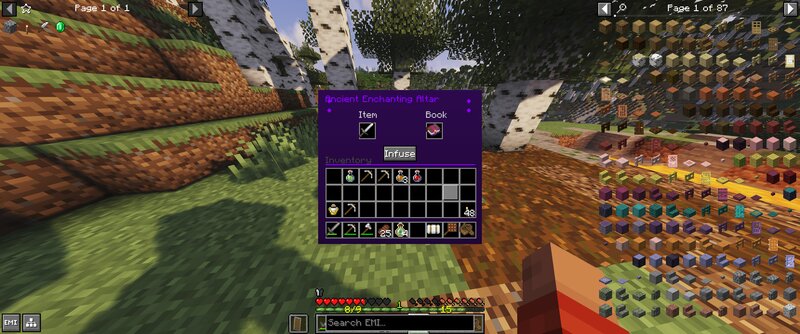
Creator notes
Far From Home (Neoforge 21.1.215) - The world scales. The deeper you go, the deadlier it becomes. The loot matches the risk. A server and client mod that transforms Minecraft into a distance-based progression system. Spawn is safe. Everything beyond becomes increasingly dangerous—and rewarding. Core Systems: - Safe Zone - Configurable spawn radius with PVP disabled. But camping here is punished: ore mining has a 25% chance to yield nothing ("Your skill led you to believe there was ore here, but nothing was recovered"), and diamonds drop at only 1% rate. The message is clear: leave . - Distance Scaling - The further from spawn, the stronger the monsters. Level ranges scale dynamically. Mob density adjusts with distance. At 10k blocks, mobs stop burning in daylight. At 100k blocks, you're facing level 500+ enemies. At 1 million blocks, level 2000+. - Ore Scaling - Mining yields increase in dangerous territories. Risk = reward. - Loot Bags - Killed monsters drop tiered loot bags (Common → Legendary) containing gear, valuables, and Greater Experience Bottles (50-100 XP per bottle). - Ancient Enchanting Altar - The ultimate drop. Legendary loot bags have a rare chance to contain this it
Added value
What’s included on this page
Preview, categories, compatibility, and tools on this page — not a bare file mirror.
- Creator
- Bleepz
- Source
- Minecraft downloads library on Eaglercraft Studio
- Type
- Minecraft mod
- Price
- Free download on Eaglercraft Studio
- Curation
- Listed with credit to Bleepz · studio preview & install guide
- Game Version
- Minecraft 1.21.1
- Compatible with
- Minecraft Java (match version / loader in facts)
- Tags
- New Content
Install guide
How to install this free Minecraft mod
Eaglercraft Studio listing with metadata, creator credit, and loader-aware install guidance.
- 1Download the jar/zip when available.
- 2Install the matching loader (Forge, Fabric, or NeoForge) for your Minecraft version.
- 3Drop the mod into your mods folder, then launch with that profile.
Wrong loader or game version usually crashes on startup — read the facts on this page first.
Related free mods
More curated mods from the same library section.

Pastelmooncrafting15 · 67 diamonds · 20 views

PotatoWolfie · 60 diamonds · 2 views

PotatoWolfie · 53 diamonds · 622 views

Janss_33PL · 47 diamonds · 940 views