
Final Destruction
Creator: jaqbtor · 2025-12-27 · Mods · Free on Eaglercraft Studio
Download Final Destruction — free Minecraft mod. Created by jaqbtor. Tagged boom, destruction, mod, other. Check the file details for Forge, Fabric, or NeoForge before installing.
Creator notes
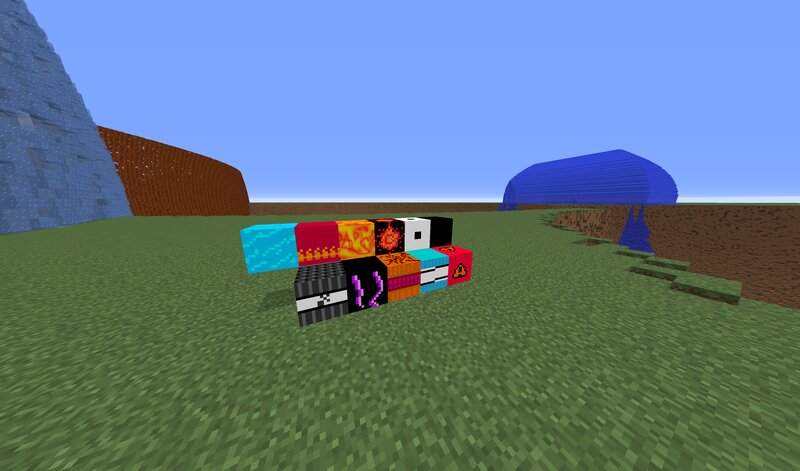
1.12.2/1.15.2/1.16.5 Mod Adding some new TNT (from weakest to strongest order) (rendering time at test platform: 6 GB RAM 3200 MHz CL 16 AMD CPU 8 x 3,8-4,5 GHz flat world height 190 blocks) casual TNT instant thunder TNT 10 s serious TNT 4 s splash TNT 10 s ULTRA Serious TNT 16 s Crystal TNT 3 min Carnage TNT 6 min Inferno TNT 12 min Chaos and destruction 15 min Ultimate Compressor NOT TESTED estimate over 30 min recommended over 8GB of RAM Final Destruction NOT TESTED estimate over 1 h recommended over 16GB of RAM Eye NOT TESTED estimate over 1 h recommended over 16GB of RAM Ultimate Final Flash Big Bang NOT TESTED give me all your RAM and wait Color NOT TESTED give me all your RAM and wait U.F.S.U.D.E.O.U.D NOT TESTED give me all your RAM and wait (rendering time at test platform: 64 GB RAM 3200 MHz CL 16 Intel CPU 10 x 3,8-4,9 GHz) (unrestricted deep/height world) Eye 8 min Ultimate Compressor 15 min Final Destruction under 1 h 30 min Ultimate Final Flash Big Bang 7h U.F.S.U.D.E.O.U.D 15h 100GB of RAM Mod also include lighter version of some TNT which render ~15% faster
Added value
What’s included on this page
Preview, categories, compatibility, and tools on this page — not a bare file mirror.
- Creator
- jaqbtor
- Source
- Minecraft downloads library on Eaglercraft Studio
- Type
- Minecraft mod
- Price
- Free download on Eaglercraft Studio
- Curation
- Listed with credit to jaqbtor · studio preview & install guide
- Game Version
- Minecraft 1.12.2
- Compatible with
- Minecraft Java (match version / loader in facts)
- Tags
- Boom, Destruction, Mod, Other, Tnt
Install guide
How to install this free Minecraft mod
Eaglercraft Studio listing with metadata, creator credit, and loader-aware install guidance.
- 1Download the jar/zip when available.
- 2Install the matching loader (Forge, Fabric, or NeoForge) for your Minecraft version.
- 3Drop the mod into your mods folder, then launch with that profile.
Wrong loader or game version usually crashes on startup — read the facts on this page first.
Related free mods
More curated mods from the same library section.

Pastelmooncrafting15 · 67 diamonds · 20 views

PotatoWolfie · 60 diamonds · 2 views

PotatoWolfie · 53 diamonds · 622 views

Janss_33PL · 47 diamonds · 940 views