
FirstAid HUD Scale
Creator: takapii_kun0717 · 2026-09-11 · Mods · Free on Eaglercraft Studio
Download FirstAid HUD Scale — free Minecraft mod. Created by takapii_kun0717. Tagged other. Check the file details for Forge, Fabric, or NeoForge before installing.
Creator notes
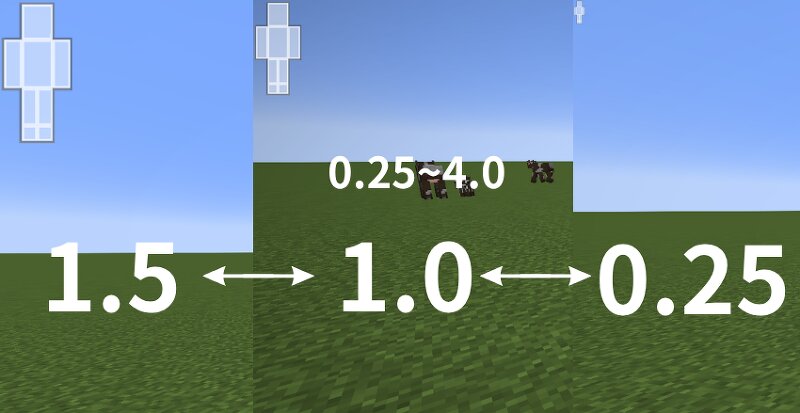
# First Aid HUD Scale This is a lightweight add-on MOD that allows you to freely zoom in and out on the **First Aid** health HUD (body part display) **using only the config**. Since this isn’t a setting you’ll likely adjust frequently, it’s managed via `config/faidhudscale-client.toml` rather than through in-game options. It’s perfect for players who find the HUD too large or too small when they increase the UI scale. ## ✨ Features - Change the First Aid HUD size simply by editing the config (scale from 0.25 to 4.0) - Designed to remain stable even after First Aid updates, as it does not directly modify First Aid’s core code (does not use Mixins, etc.) - Completely optional dependency; will not crash even if First Aid is not installed - Lightweight with minimal ongoing processing; virtually no impact on performance ## 📋 System Requirements | Item | Version | |---|---| | Minecraft | 1.20.1 | | Minecraft Forge | 47.4.10 or later | | Dependent Mod | First Aid (not required, but this mod is pointless without it) | ## 🔧 Installation Instructions 1. Install Minecraft Forge 1.20.1 (47.4.10 or later) 2. Place First Aid in the `mods` folder 3. Place this mod’s JAR file in the same `mods` fo
Added value
What’s included on this page
Preview, categories, compatibility, and tools on this page — not a bare file mirror.
- Creator
- takapii_kun0717
- Source
- Minecraft downloads library on Eaglercraft Studio
- Type
- Minecraft mod
- Price
- Free download on Eaglercraft Studio
- Curation
- Listed with credit to takapii_kun0717 · studio preview & install guide
- Game Version
- Minecraft 1.20.1
- Compatible with
- Minecraft Java (match version / loader in facts)
- Tags
- Other
Install guide
How to install this free Minecraft mod
Eaglercraft Studio listing with metadata, creator credit, and loader-aware install guidance.
- 1Download the jar/zip when available.
- 2Install the matching loader (Forge, Fabric, or NeoForge) for your Minecraft version.
- 3Drop the mod into your mods folder, then launch with that profile.
Wrong loader or game version usually crashes on startup — read the facts on this page first.
Related free mods
More curated mods from the same library section.

Pastelmooncrafting15 · 67 diamonds · 20 views

PotatoWolfie · 60 diamonds · 2 views

PotatoWolfie · 53 diamonds · 622 views

Janss_33PL · 47 diamonds · 940 views