
Floppy HUD Mod 1.21.1
Creator: daGoncs · 2026-05-08 · Mods · Free on Eaglercraft Studio
Download Floppy HUD Mod 1.21.1 — free Minecraft mod. Created by daGoncs. Tagged 3dshareware, aprilfools, doom, functional. Check the file details for Forge, Fabric, or NeoForge before installing.
Creator notes
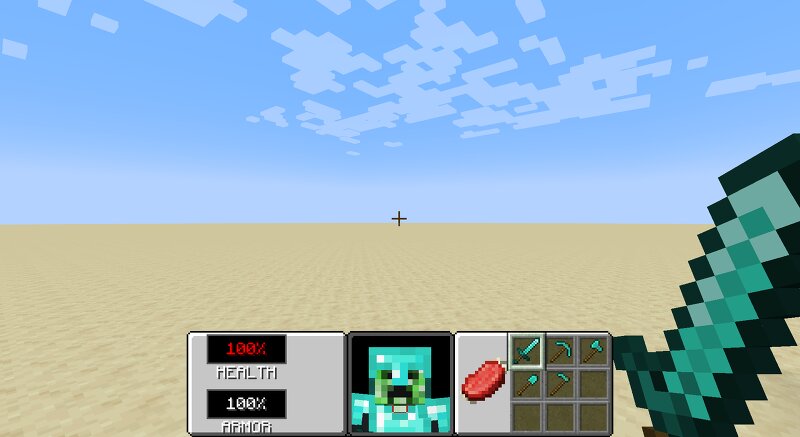
# Floppy HUD **Floppy HUD** is a total client-side HUD conversion mod for Minecraft **NeoForge 1.21.1**. It completely replaces the vanilla Minecraft interface with a nostalgic, fully functional retro UI inspired by the legendary 1993 Doom shareware release. This mod is a port of the HUD from the official April Fools 2019 Minecraft version '3D Shareware v1.34' with new features. ## Features * **The Classic Panel:** A custom, fully transparent 256x64 retro hotbar panel that anchors beautifully to the bottom of the screen. * **Live 3D Player Face:** A fully animated, 3D rendering of the player's face right in the center of the HUD. The model features custom rotation math to simulate "looking around" while perfectly freezing the actual entity's hitboxes in the game world. * **Dynamic Pixel-Perfect Status Bars:** * **Hunger:** A classic meat shank icon that gradually slices itself away pixel-by-pixel as you starve, using exact bounding-box UV math. * **Oxygen:** A custom bubble icon that seamlessly appears and shrinks when diving underwater. * **Clean Text & Translations:** Features native Minecraft localization support (fully translatable `HEALTH` and `ARMOR` text) and dynamic percent
Added value
What’s included on this page
Preview, categories, compatibility, and tools on this page — not a bare file mirror.
- Creator
- daGoncs
- Source
- Minecraft downloads library on Eaglercraft Studio
- Type
- Minecraft mod
- Price
- Free download on Eaglercraft Studio
- Curation
- Listed with credit to daGoncs · studio preview & install guide
- Game Version
- Minecraft 1.21.1
- Compatible with
- Minecraft Java (match version / loader in facts)
- Tags
- 3dshareware, Aprilfools, Doom, Functional, Gui, Hud
Install guide
How to install this free Minecraft mod
Eaglercraft Studio listing with metadata, creator credit, and loader-aware install guidance.
- 1Download the jar/zip when available.
- 2Install the matching loader (Forge, Fabric, or NeoForge) for your Minecraft version.
- 3Drop the mod into your mods folder, then launch with that profile.
Wrong loader or game version usually crashes on startup — read the facts on this page first.
Related free mods
More curated mods from the same library section.

Pastelmooncrafting15 · 67 diamonds · 20 views

PotatoWolfie · 60 diamonds · 2 views

PotatoWolfie · 53 diamonds · 622 views

Janss_33PL · 47 diamonds · 940 views