
Frontier Stats
Creator: Bleepz · 2025-11-24 · Mods · Free on Eaglercraft Studio
Download Frontier Stats — free Minecraft mod. Created by Bleepz. Tagged other. Check the file details for Forge, Fabric, or NeoForge before installing.
Creator notes
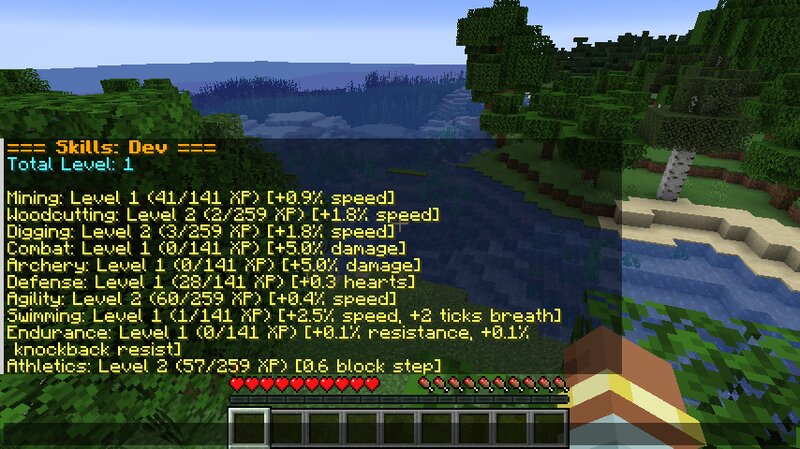
Frontier Stats (Neoforge 21.1.215) - Guilds, bounties, and warfare with permanent consequences and milestones to discover. A server-side mod that adds skills, stat tracking, and guild warfare to survival Minecraft. This mod has an emphasis on player choice and rewards players for reaching milestones. No client installation required. What it does: - Guilds without deep hierarchies - Form teams with shared chest protection. No guild masters, no ranks—organize naturally or fall apart trying. - Bounty hunting - Players on kill streaks get marked. Their coordinates become public. Take them down for rewards. - Mutual war declarations - Guilds can opt into structured PvP raids. Both sides must agree. Chest protections drop . Seven-day timer or peace treaty to end. - Permanent guild departure - Leave a guild? You can never rejoin. Choose your allies carefully. - Player progression (Now enhanced!) - Ever feel like it would be cool to progressively improve your character without feeling like you beat the game in two days? If yes, this mod has you covered. Configs allow a high degree of control, test what level of progression works for your server and you're players. (AttributeFix is highly r
Added value
What’s included on this page
Preview, categories, compatibility, and tools on this page — not a bare file mirror.
- Creator
- Bleepz
- Source
- Minecraft downloads library on Eaglercraft Studio
- Type
- Minecraft mod
- Price
- Free download on Eaglercraft Studio
- Curation
- Listed with credit to Bleepz · studio preview & install guide
- Game Version
- Minecraft 1.21.1
- Compatible with
- Minecraft Java (match version / loader in facts)
- Tags
- Other
Install guide
How to install this free Minecraft mod
Eaglercraft Studio listing with metadata, creator credit, and loader-aware install guidance.
- 1Download the jar/zip when available.
- 2Install the matching loader (Forge, Fabric, or NeoForge) for your Minecraft version.
- 3Drop the mod into your mods folder, then launch with that profile.
Wrong loader or game version usually crashes on startup — read the facts on this page first.
Related free mods
More curated mods from the same library section.

Pastelmooncrafting15 · 67 diamonds · 20 views

PotatoWolfie · 60 diamonds · 2 views

PotatoWolfie · 53 diamonds · 622 views

Janss_33PL · 47 diamonds · 940 views