
Fuextras!
Creator: slightlyexpiredT6 · 2026-09-17 · Mods · Free on Eaglercraft Studio
Download Fuextras! — free Minecraft mod. Created by slightlyexpiredT6. Tagged aesthetic, beta, client, retro. Check the file details for Forge, Fabric, or NeoForge before installing.
Creator notes
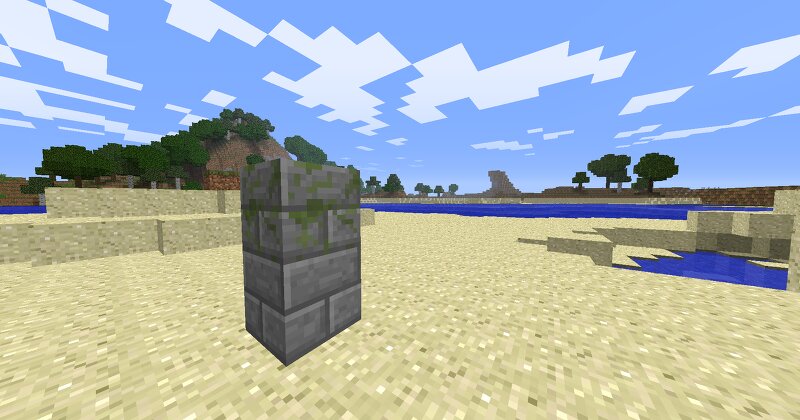
Features Backported Stone Bricks Adds a recipe for Moss Stone Backported Redstone and Coal blocks Re-adds Rose(Rose Pink), Ultramarine and old Purple(Violet) wool colors Adds 3 new flowers: Pink Tulip, Ultramarine Rose and the Violet Flower. These flowers generate like the other 2! :D Added Quartz ore, which generates in the nether. Can be used to make Quartz and Quartz Pillars Backported Chirp music disc! Generates in dungeon chests! :D Planned Features Custom Music and/or Music Disc Plans to backport the rest of the Music discs Anything you guys reccomend :D! IMPORTAINT STUFF!!! This mod is a Jar mod and is incompatible with Singleplayer Commands, Too Many Items, and How Many Items! But the others should be fine :D! Instalation MultiMC / Prism Launcher Right-click your Beta 1.7.3 instance and select Edit Instance Go to the Loader Mods or jar mods tab Click Add to Minecraft.jar and select the downloaded .zip Launch the game Manual Locate your minecraft.jar (.minecraft/bin/minecraft.jar) Open it with any archive tool (e.g. 7-Zip or WinRAR) Delete the META-INF folder inside the jar Drag and drop the mod files into the jar Save and launch the game.
Added value
What’s included on this page
Preview, categories, compatibility, and tools on this page — not a bare file mirror.
- Creator
- slightlyexpiredT6
- Source
- Minecraft downloads library on Eaglercraft Studio
- Type
- Minecraft mod
- Price
- Free download on Eaglercraft Studio
- Curation
- Listed with credit to slightlyexpiredT6 · studio preview & install guide
- Game Version
- Minecraft 1.7 beta
- Compatible with
- Minecraft Java (match version / loader in facts)
- Tags
- Aesthetic, Beta, Client, Retro, Wool
Install guide
How to install this free Minecraft mod
Eaglercraft Studio listing with metadata, creator credit, and loader-aware install guidance.
- 1Download the jar/zip when available.
- 2Install the matching loader (Forge, Fabric, or NeoForge) for your Minecraft version.
- 3Drop the mod into your mods folder, then launch with that profile.
Wrong loader or game version usually crashes on startup — read the facts on this page first.
Related free mods
More curated mods from the same library section.

Pastelmooncrafting15 · 67 diamonds · 20 views

PotatoWolfie · 60 diamonds · 2 views

PotatoWolfie · 53 diamonds · 622 views

Janss_33PL · 47 diamonds · 940 views