
Gauges and Switches Ported (RsGauges)
Creator: MCFabikDE · 2026-05-01 · Mods · Free on Eaglercraft Studio
Download Gauges and Switches Ported (RsGauges) — free Minecraft mod. Created by MCFabikDE. Tagged functional. Check the file details for Forge, Fabric, or NeoForge before installing.
Creator notes
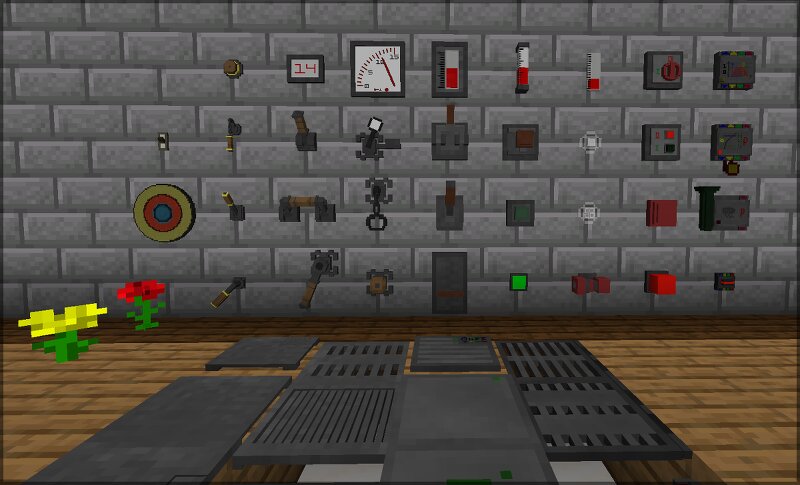
This is an unofficial port of the RsGauges (Gauges and Switches) mod for NeoForge 1.21.1. This version is based on the 1.20.1 port by Waffle, which in turn is based on the original by Wile. Since many players are switching to the latest version of Minecraft, I have updated the mod for the current NeoForge environment. The mod adds devices to output or measure Redstone power in various styles. Features Switches Buttons & Levers: Buttons and levers in many designs. Pressure Plates: Standard pressure plates and shock-sensitive variants (react to falls). Detectors: Sensors for entities (players, animals, mobs) and block categories (ores, wood, liquids, etc.). Timers: Daily timers (6:00 AM to 12:00 AM) and interval timers (tick-based). Environment: Light, rain, and lightning sensors. Specialized: Switch-Link relays & receivers (wireless transmission), knock sensors, and trapdoor switches. Gauges Analog & Digital: Displays Redstone strength from 0 to 15. Indicators: LEDs, semaphores, and alarm lights (on/off). Audio: Alarm sirens and bells. Sensitive Glass: Glass that emits light or changes color. Style Variations The devices come in various “series” such as Industrial, Retro Industrial,
Added value
What’s included on this page
Preview, categories, compatibility, and tools on this page — not a bare file mirror.
- Creator
- MCFabikDE
- Source
- Minecraft downloads library on Eaglercraft Studio
- Type
- Minecraft mod
- Price
- Free download on Eaglercraft Studio
- Curation
- Listed with credit to MCFabikDE · studio preview & install guide
- Game Version
- Minecraft 1.21.1
- Compatible with
- Minecraft Java (match version / loader in facts)
- Tags
- Functional
Install guide
How to install this free Minecraft mod
Eaglercraft Studio listing with metadata, creator credit, and loader-aware install guidance.
- 1Download the jar/zip when available.
- 2Install the matching loader (Forge, Fabric, or NeoForge) for your Minecraft version.
- 3Drop the mod into your mods folder, then launch with that profile.
Wrong loader or game version usually crashes on startup — read the facts on this page first.
Related free mods
More curated mods from the same library section.

Pastelmooncrafting15 · 67 diamonds · 20 views

PotatoWolfie · 60 diamonds · 2 views

PotatoWolfie · 53 diamonds · 622 views

Janss_33PL · 47 diamonds · 940 views