
Happy Ghast Parking
Creator: marcsanz-dev · 2026-03-11 · Mods · Free on Eaglercraft Studio
Download Happy Ghast Parking — free Minecraft mod. Created by marcsanz-dev. Tagged other. Check the file details for Forge, Fabric, or NeoForge before installing.
Creator notes
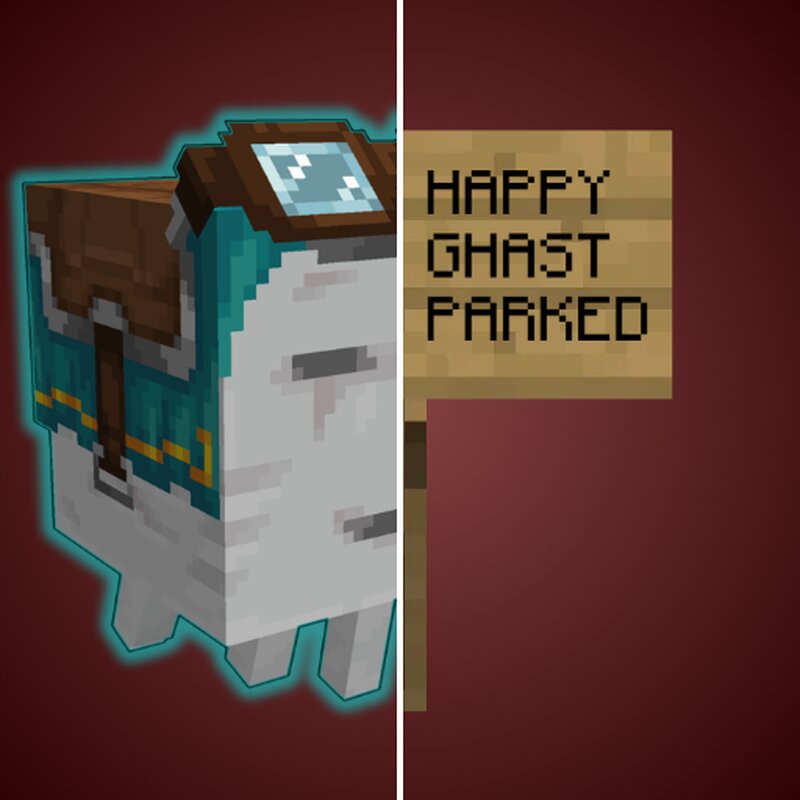
Happy Ghast Parking Have you ever tried to build, mine, or explore while riding a Happy Ghast, only to find it drifting away the moment you dismount? Happy Ghast Parking is the ultimate Quality of Life (QoL) mod that allows you to park your mount perfectly still in mid-air! Designed for builders and explorers, this mod gives you total control over your Nether companion. Mid-Air Parking and Safe Dismounting Park your Happy Ghast anywhere in the air! Whether you are chopping down trees, mining high walls, or just leaving it in a dedicated parking spot at your base, your mount will stay completely frozen. It will patiently wait for your return exactly where you left it, completely unaffected by gravity or AI wandering. 🛑🏗️ Dynamic Glowing Colors When parked, your Happy Ghast will emit a helpful glowing outline so you can easily spot it from a distance. But it's not just a generic glow—it dynamically matches the exact dye color of the harness you have equipped! Collect all 16 colors to fully customize your mount and make it shine in the dark. 🌈✨ Increased Flying Speed Tired of slow travel? Boost your Happy Ghast's flying speed to zip across the Overworld and the Nether in record time!
Added value
What’s included on this page
Preview, categories, compatibility, and tools on this page — not a bare file mirror.
- Creator
- marcsanz-dev
- Source
- Minecraft downloads library on Eaglercraft Studio
- Type
- Minecraft mod
- Price
- Free download on Eaglercraft Studio
- Curation
- Listed with credit to marcsanz-dev · studio preview & install guide
- Game Version
- Minecraft 1.21.11
- Compatible with
- Minecraft Java (match version / loader in facts)
- Tags
- Other
Install guide
How to install this free Minecraft mod
Eaglercraft Studio listing with metadata, creator credit, and loader-aware install guidance.
- 1Download the jar/zip when available.
- 2Install the matching loader (Forge, Fabric, or NeoForge) for your Minecraft version.
- 3Drop the mod into your mods folder, then launch with that profile.
Wrong loader or game version usually crashes on startup — read the facts on this page first.
Related free mods
More curated mods from the same library section.

Pastelmooncrafting15 · 67 diamonds · 20 views

PotatoWolfie · 60 diamonds · 2 views

PotatoWolfie · 53 diamonds · 622 views

Janss_33PL · 47 diamonds · 940 views