
🔥 Hardcore HUD | BlazeAndCave — Прогресс, таймер и статистика
Creator: xxxquad · 2026-05-03 · Mods · Free on Eaglercraft Studio
Download 🔥 Hardcore HUD | BlazeAndCave — Прогресс, таймер и статистика — free Minecraft mod. Created by xxxquad. Tagged other. Check the file details for Forge, Fabric, or NeoForge before installing.
Creator notes
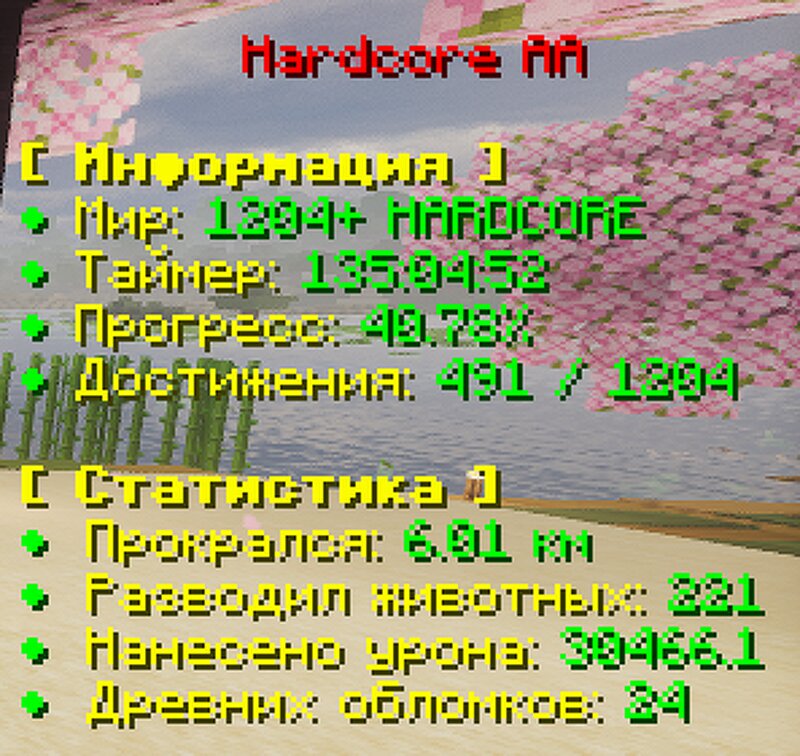
Are you playing BlazeAndCave? Tired of guessing which advancements are done and what the world timer is? I made Hardcore HUD — an informative overlay specifically for this datapack. ❗IMPORTANT — READ BEFORE PURCHASE: The mod works ONLY with the BlazeAndCave datapack: 🔗 https://www.planetminecraft.com/data-pack/blazeandcave-s-advancements-pack-1-12/ The mod is for a single world only (Singleplayer). To count advancements, you MUST run the command in chat ONCE (no need to repeat): /scoreboard groups setdisplay list bac_advancements The mod does NOT update in real time — the statistics update when the world saves (for example, just press ESC and close the menu — the numbers will update). ⚠️IMPORTANT WARNING: If you have different worlds with the same name (e.g., New World), the mod may mix up the statistics. Give your worlds unique names so everything works correctly. 📊 What the mod shows: Animated HUD title — transitions from green to red 3 statistics pages + general info (timer, progress, advancements) Pages automatically cycle every 10 seconds ⚙️ Technical requirements (mandatory): Minecraft: 1.21.11 (this version only) Fabric Loader: 0.18.4 or newer Fabric API: any 0.141.x version
Added value
What’s included on this page
Preview, categories, compatibility, and tools on this page — not a bare file mirror.
- Creator
- xxxquad
- Source
- Minecraft downloads library on Eaglercraft Studio
- Type
- Minecraft mod
- Price
- Free download on Eaglercraft Studio
- Curation
- Listed with credit to xxxquad · studio preview & install guide
- Game Version
- Minecraft 1.21.11
- Compatible with
- Minecraft Java (match version / loader in facts)
- Tags
- Other
Install guide
How to install this free Minecraft mod
Eaglercraft Studio listing with metadata, creator credit, and loader-aware install guidance.
- 1Download the jar/zip when available.
- 2Install the matching loader (Forge, Fabric, or NeoForge) for your Minecraft version.
- 3Drop the mod into your mods folder, then launch with that profile.
Wrong loader or game version usually crashes on startup — read the facts on this page first.
Related free mods
More curated mods from the same library section.

Pastelmooncrafting15 · 67 diamonds · 20 views

PotatoWolfie · 60 diamonds · 2 views

PotatoWolfie · 53 diamonds · 622 views

Janss_33PL · 47 diamonds · 940 views