
Health Based Mob Scaling
Creator: SlimeeyYt · 2026-04-02 · Mods · Free on Eaglercraft Studio
Download Health Based Mob Scaling — free Minecraft mod. Created by SlimeeyYt. Tagged fabric, minecraftjava, mods, new content. Check the file details for Forge, Fabric, or NeoForge before installing.
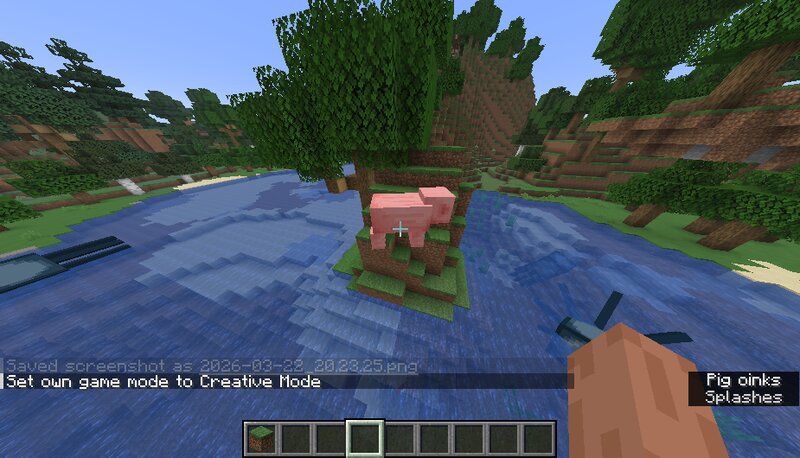
Creator notes
# 🧬 LifeScale – Health-Based Mob Scaling Bring your world to life with dynamic mob scaling! **LifeScale** makes every mob's size and movement scale with its health — creating a more immersive and challenging gameplay experience. --- ## ⚡ Features - 📈 Mobs grow larger as their health increases - 🦶 Step height increases with size (bigger mobs climb better) - ⚙️ Fully automatic — no commands needed - 🚀 Optimized for performance (updates once per second) - 👥 Only affects mobs near players (reduces lag) --- ## 🧠 How It Works Every mob dynamically updates: - **Scale = Health × 0.25** - **Step Height = Health × 0.125** This means: - Strong mobs become massive - Weak mobs shrink down --- ## 🎮 Gameplay Impact - Boss fights feel more intense - Natural difficulty scaling - More visual feedback for mob strength --- ## ⚙️ Requirements - Minecraft **1.21.1 (or compatible 1.21.x)** - Fabric Loader - Fabric API --- ## 🧪 Performance - Updates every 20 ticks (1 second) - Only affects mobs within 128 blocks of players - Designed for smooth gameplay even in large worlds --- ## 📦 Future Plans - Config file for scaling values - Smooth scaling animations - Per-mob customization --- ## 💬 Feedback Have ide
Added value
What’s included on this page
Preview, categories, compatibility, and tools on this page — not a bare file mirror.
- Creator
- SlimeeyYt
- Source
- Minecraft downloads library on Eaglercraft Studio
- Type
- Minecraft mod
- Price
- Free download on Eaglercraft Studio
- Curation
- Listed with credit to SlimeeyYt · studio preview & install guide
- Game Version
- Minecraft 1.21.11
- Compatible with
- Minecraft Java (match version / loader in facts)
- Tags
- Fabric, Minecraftjava, Mods, New Content
Install guide
How to install this free Minecraft mod
Eaglercraft Studio listing with metadata, creator credit, and loader-aware install guidance.
- 1Download the jar/zip when available.
- 2Install the matching loader (Forge, Fabric, or NeoForge) for your Minecraft version.
- 3Drop the mod into your mods folder, then launch with that profile.
Wrong loader or game version usually crashes on startup — read the facts on this page first.
Related free mods
More curated mods from the same library section.

Pastelmooncrafting15 · 67 diamonds · 20 views

PotatoWolfie · 60 diamonds · 2 views

PotatoWolfie · 53 diamonds · 622 views

Janss_33PL · 47 diamonds · 940 views