
Hello Biome
Creator: Aquarius_playz · 2025-12-16 · Mods · Free on Eaglercraft Studio
Download Hello Biome — free Minecraft mod. Created by Aquarius_playz. Tagged aesthetic, fabric, forge, neoforge. Check the file details for Forge, Fabric, or NeoForge before installing.
Creator notes
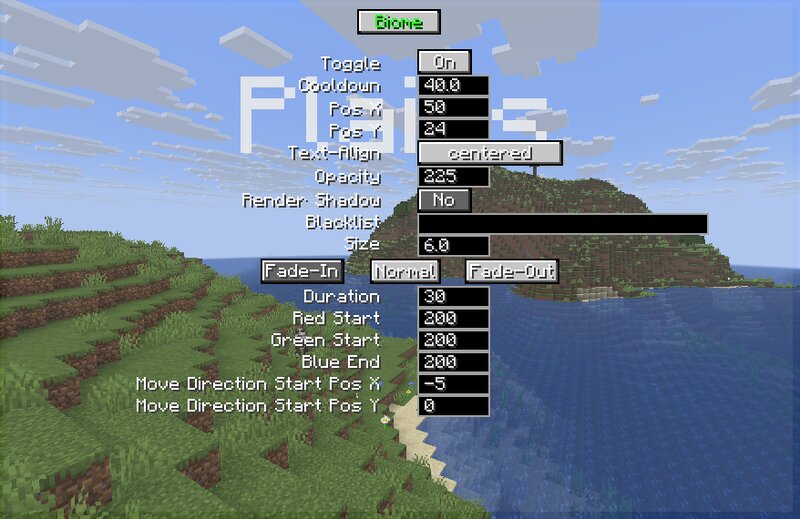
Whenever you go into another biome, the name of the biome pops up at the top of the screen. Same for dimensions. Beside that you can edit the text with the inbuilt settings screen that can be opened with the H key by default. So after you open this screen you can -switch between biome and dimension settings while clicking on the Biome or dimension button -disable these texts whenever you want -add a cooldown time between the texts -base position -text-align -max opacity (opacity of the normal text, fade-in goes to this value, and fade-out starts from this value) -enable the text shadow -text size -add biomes to a blacklist (just type river for example) also you can edit the fade-in, normal and fade-out texts -duration (uses ticks, and 20 tick is 1 second) -red, green, blue color (colors changes from fade-in to normal, then from normal to fade out) -x, y move direction (direction changes from fade-in to normal, then from normal to fade out) Mod currently supports Forge 26.1.1 | 26.1 | 1.21.11 | 1.21.10 | 1.21.9 | 1.21.8 | 1.21.5 | 1.21.4 | 1.21.1 | 1.20.1 Fabric 26.1.1 | 26.1 | 1.21.11 | 1.21.10 | 1.21.9 | 1.21.8 | 1.21.7 | 1.21.6 | 1.21.5 | 1.21.4 | 1.21.1 | 1.20.1 Neoforge 26.1.1
Added value
What’s included on this page
Preview, categories, compatibility, and tools on this page — not a bare file mirror.
- Creator
- Aquarius_playz
- Source
- Minecraft downloads library on Eaglercraft Studio
- Type
- Minecraft mod
- Price
- Free download on Eaglercraft Studio
- Curation
- Listed with credit to Aquarius_playz · studio preview & install guide
- Game Version
- Minecraft 26.1.1
- Compatible with
- Minecraft Java (match version / loader in facts)
- Tags
- Aesthetic, Fabric, Forge, Neoforge
Install guide
How to install this free Minecraft mod
Eaglercraft Studio listing with metadata, creator credit, and loader-aware install guidance.
- 1Download the jar/zip when available.
- 2Install the matching loader (Forge, Fabric, or NeoForge) for your Minecraft version.
- 3Drop the mod into your mods folder, then launch with that profile.
Wrong loader or game version usually crashes on startup — read the facts on this page first.
Related free mods
More curated mods from the same library section.

Pastelmooncrafting15 · 67 diamonds · 20 views

PotatoWolfie · 60 diamonds · 2 views

PotatoWolfie · 53 diamonds · 622 views

Janss_33PL · 47 diamonds · 940 views