
i hate shadows - Minecraft 26.1.2 - Fullbright Shader
Creator: xsoras · 2026-06-05 · Mods · Free on Eaglercraft Studio
Download i hate shadows - Minecraft 26.1.2 - Fullbright Shader — free Minecraft mod. Created by xsoras. Tagged aesthetic, best, fullbright, ihateshadows. Check the file details for Forge, Fabric, or NeoForge before installing.
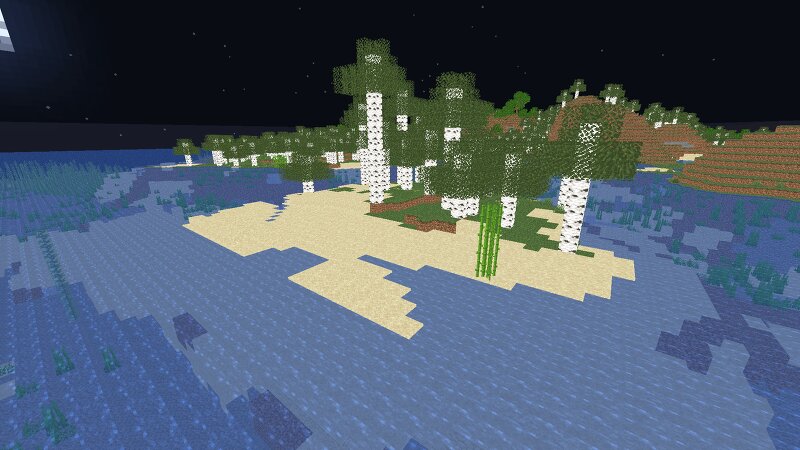
Creator notes
✨ I REALLY HATE SHADOWS… i hate shadows is a lightweight Minecraft shader that does one thing — and does it perfectly: it removes every single shadow . 🌞 No dark corners, no spooky vibes — just pure, bright daylight everywhere you look. Perfect for players who love minimal visuals, boosted performance, and a world that never hides in the dark. 🌟 Features ❌ No shadows at all ⚡ FPS-friendly, super lightweight 🌞 Always bright, clean visuals 🎮 Works great on low-end systems 🧠 Lamapi: Next-Gen Open Source AI Pushing the boundaries of accessible intelligence. Whether you need lightweight efficiency or industrial-grade reasoning, the Next Series delivers. Why build with Lamapi? ⚡ High Efficiency: From compact 1B models to powerful 70B reasoning engines. 🌍 Multilingual Mastery: Optimized for superior performance in English & Turkish. 🛠️ Ready to Deploy: State-of-the-art open weights available immediately. Explore our models and start building: 🔗 https://huggingface.co/Lamapi 🚀 KCB Hosting: Power Meets Reliability Looking for a host that takes your gaming experience as seriously as you do? We provide robust infrastructure ensuring smooth gameplay and enterprise-grade uptime. Why switc
Added value
What’s included on this page
Preview, categories, compatibility, and tools on this page — not a bare file mirror.
- Creator
- xsoras
- Source
- Minecraft downloads library on Eaglercraft Studio
- Type
- Minecraft mod
- Price
- Free download on Eaglercraft Studio
- Curation
- Listed with credit to xsoras · studio preview & install guide
- Game Version
- Minecraft 26.1.2
- Compatible with
- Minecraft Java (match version / loader in facts)
- Tags
- Aesthetic, Best, Fullbright, Ihateshadows, Minecraft, Qol
Install guide
How to install this free Minecraft mod
Eaglercraft Studio listing with metadata, creator credit, and loader-aware install guidance.
- 1Download the jar/zip when available.
- 2Install the matching loader (Forge, Fabric, or NeoForge) for your Minecraft version.
- 3Drop the mod into your mods folder, then launch with that profile.
Wrong loader or game version usually crashes on startup — read the facts on this page first.
Related free mods
More curated mods from the same library section.

Pastelmooncrafting15 · 67 diamonds · 20 views

PotatoWolfie · 60 diamonds · 2 views

PotatoWolfie · 53 diamonds · 622 views

Janss_33PL · 47 diamonds · 940 views