
Infinite Gauntlet
Creator: LGC_HorrorGame · 2026-03-03 · Mods · Free on Eaglercraft Studio
Download Infinite Gauntlet — free Minecraft mod. Created by LGC_HorrorGame. Tagged other. Check the file details for Forge, Fabric, or NeoForge before installing.
Creator notes
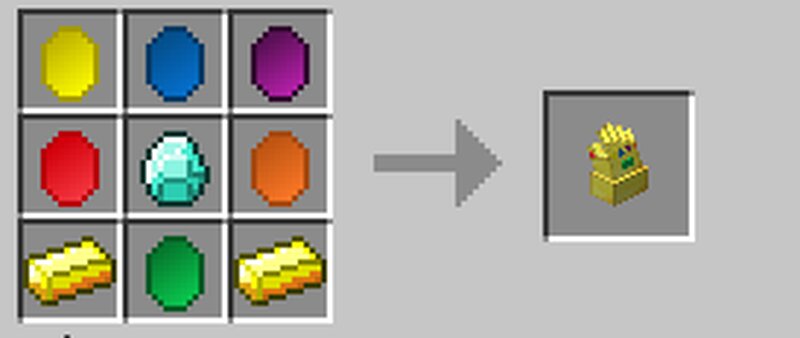
The infinity gauntlet mod add the Infinity Gems and Infinity Gauntlet into Minecraft. Find and discover the infinity gems and utilizes their extreme over powered abilities in Minecraft. Kill anything that stands in your way, set mobs to attack each other, quickly teleport across the land, and more. Assemble all 6 gems, some gold, and a diamond, and create the Infinity Gauntlet and bring out the true powers of the gems and the extreme powers. FAQ: Q: How do I get the infinity gems? A: Each gem, can only be found in game as rare dungeon loot or spawned through the give command. Ones that appear in the creative menu are 'Replicas' that have no real power. Q: How do I get the gauntlet? A: By crafting, the recipe is in the images section Q: How do I switch which Infinity Gem, the gauntlet uses? A: There is a keybind command you press to switch between them, by default it is C. Q: There is a particle going around me. A: I am testing out a particle system for certain people who contributed to this mod in some way. You can hide this particle by running the command, /toggle_ig_particule, which is available for all users, including non-ops.
Added value
What’s included on this page
Preview, categories, compatibility, and tools on this page — not a bare file mirror.
- Creator
- LGC_HorrorGame
- Source
- Minecraft downloads library on Eaglercraft Studio
- Type
- Minecraft mod
- Price
- Free download on Eaglercraft Studio
- Curation
- Listed with credit to LGC_HorrorGame · studio preview & install guide
- Game Version
- Minecraft 1.7.10
- Compatible with
- Minecraft Java (match version / loader in facts)
- Tags
- Other
Install guide
How to install this free Minecraft mod
Eaglercraft Studio listing with metadata, creator credit, and loader-aware install guidance.
- 1Download the jar/zip when available.
- 2Install the matching loader (Forge, Fabric, or NeoForge) for your Minecraft version.
- 3Drop the mod into your mods folder, then launch with that profile.
Wrong loader or game version usually crashes on startup — read the facts on this page first.
Related free mods
More curated mods from the same library section.

Pastelmooncrafting15 · 67 diamonds · 20 views

PotatoWolfie · 60 diamonds · 2 views

PotatoWolfie · 53 diamonds · 622 views

Janss_33PL · 47 diamonds · 940 views