
InkQuest
Creator: K4K · 2026-06-07 · Mods · Free on Eaglercraft Studio
Download InkQuest — free Minecraft mod. Created by K4K. Tagged adventure, command, fabric, functional. Check the file details for Forge, Fabric, or NeoForge before installing.
Creator notes
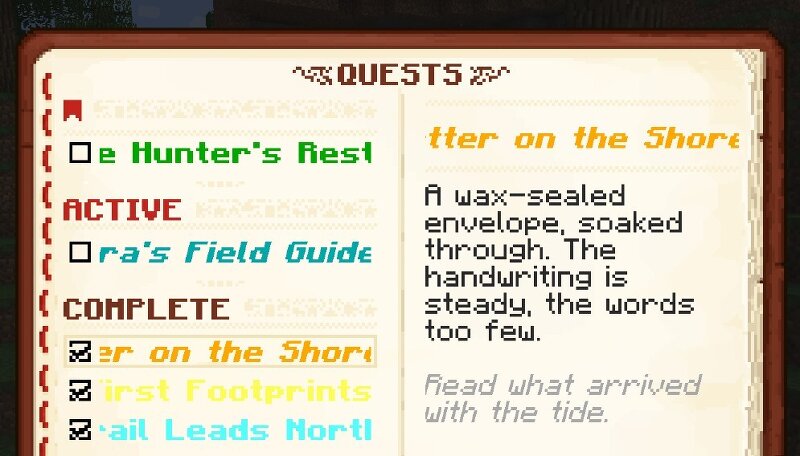
InkQuest — Narrative Quest Engine Build story-driven quests for Minecraft — using tools you already know. InkQuest is a lightweight quest engine for Minecraft 1.20.1 (Fabric), built for map makers, pack developers, and narrative designers. It works with scoreboards, Minecraft predicates, and datapack functions — systems you already have. No proprietary task types to learn. Quests have real failure states , stage-by-stage progression, and branching based on outcomes. Choices that mean something. Endings that differ. What players experience Quest Book — press J or right-click the book to browse all quests: active, completed, and failed. Each shows title, current task, description, and progress. HUD tracker — pin a quest to keep its task and progress bar always on screen, with smooth stage-transition and completion animations. Quest Scrolls — a physical item that starts a quest on right-click. Distribute via loot tables, trades, or /give — the player just right-clicks, no commands on their end. New quest notification — a HUD toast when a quest arrives, with one key to open it immediately. How InkQuest works Stages, not checkboxes. A quest advances through stages in sequence. Each stag
Added value
What’s included on this page
Preview, categories, compatibility, and tools on this page — not a bare file mirror.
- Creator
- K4K
- Source
- Minecraft downloads library on Eaglercraft Studio
- Type
- Minecraft mod
- Price
- Free download on Eaglercraft Studio
- Curation
- Listed with credit to K4K · studio preview & install guide
- Game Version
- Minecraft 1.20.1
- Compatible with
- Minecraft Java (match version / loader in facts)
- Tags
- Adventure, Command, Fabric, Functional, Game Mechanics, Java
Install guide
How to install this free Minecraft mod
Eaglercraft Studio listing with metadata, creator credit, and loader-aware install guidance.
- 1Download the jar/zip when available.
- 2Install the matching loader (Forge, Fabric, or NeoForge) for your Minecraft version.
- 3Drop the mod into your mods folder, then launch with that profile.
Wrong loader or game version usually crashes on startup — read the facts on this page first.
Related free mods
More curated mods from the same library section.

Pastelmooncrafting15 · 67 diamonds · 20 views

PotatoWolfie · 60 diamonds · 2 views

PotatoWolfie · 53 diamonds · 622 views

Janss_33PL · 47 diamonds · 940 views