
Kills, Death & Block Break Counter
Creator: PlayZerMc_PawanBhai · 2026-04-28 · Mods · Free on Eaglercraft Studio
Download Kills, Death & Block Break Counter — free Minecraft mod. Created by PlayZerMc_PawanBhai. Tagged bedrock, block break counter, death counter, functional. Check the file details for Forge, Fabric, or NeoForge before installing.
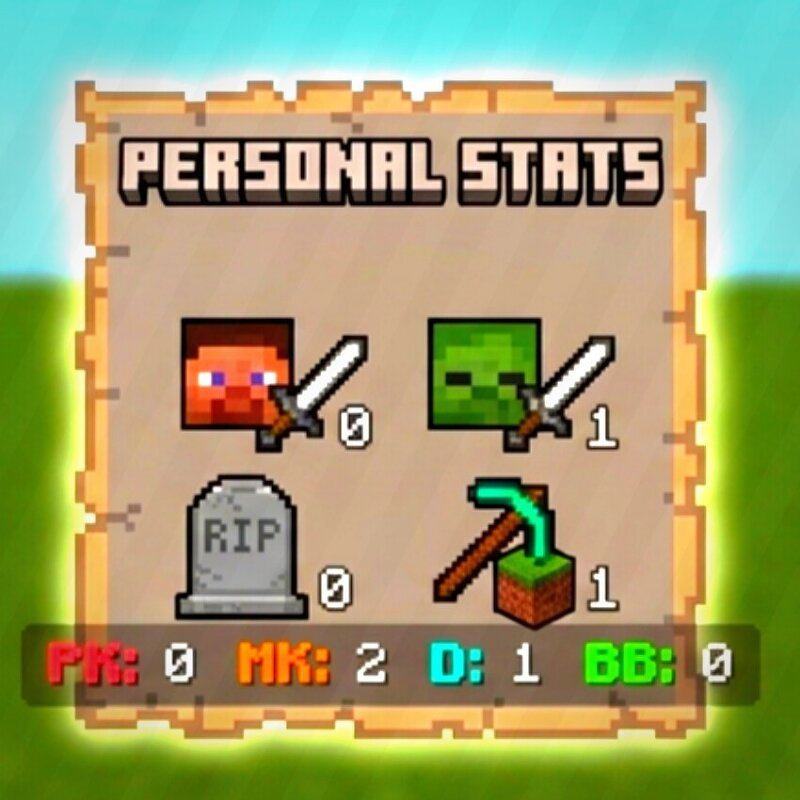
Creator notes
Tired of bulky sidebars and laggy command-block systems? Personal Stats Tracker is a professional-grade Behavior Pack built using the Minecraft Scripting API (JavaScript). It provides real-time tracking of your gameplay milestones without cluttering your screen or dropping your TPS. ✨ Key Features 🚫 No Sidebar Clutter: Keeps your screen clean. All stats are displayed on the Action Bar (above the hotbar). 🔒 Personal Display: Each player sees only their own stats—perfect for competitive Realms and SMPs. ⚡ Zero Lag: Uses high-performance Scripting API instead of repeating command blocks. 📊 Comprehensive Tracking: PK (Player Kills): Track how many players you've defeated. MK (Mob Kills): Keep count of every mob you hunt. D (Deaths): Monitor your survival rate. BB (Block Breaks): Track your mining and progress. 🛠️ Technical Specifications Version Support: 1.20.70, 1.21.x, and future-ready for 1.26+. Compatibility: Works on Android, iOS, Windows 10/11, and Consoles. Multiplayer Ready: Fully optimized for Realms and dedicated servers. ⚙️ Installation & Setup Download the .mcpack and import it into Minecraft. Add the Behavior Pack to your world. IMPORTANT: Enable "Beta APIs" (Experimental
Added value
What’s included on this page
Preview, categories, compatibility, and tools on this page — not a bare file mirror.
- Creator
- PlayZerMc_PawanBhai
- Source
- Minecraft downloads library on Eaglercraft Studio
- Type
- Minecraft mod
- Price
- Free download on Eaglercraft Studio
- Curation
- Listed with credit to PlayZerMc_PawanBhai · studio preview & install guide
- Game Version
- Minecraft 26.1.1
- Compatible with
- Minecraft Java (match version / loader in facts)
- Tags
- Bedrock, Block Break Counter, Death Counter, Functional, Kill Counter, Mcpe
Install guide
How to install this free Minecraft mod
Eaglercraft Studio listing with metadata, creator credit, and loader-aware install guidance.
- 1Download the jar/zip when available.
- 2Install the matching loader (Forge, Fabric, or NeoForge) for your Minecraft version.
- 3Drop the mod into your mods folder, then launch with that profile.
Wrong loader or game version usually crashes on startup — read the facts on this page first.
Related free mods
More curated mods from the same library section.

Pastelmooncrafting15 · 67 diamonds · 20 views

PotatoWolfie · 60 diamonds · 2 views

PotatoWolfie · 53 diamonds · 622 views

Janss_33PL · 47 diamonds · 940 views