
Kossman Stats
Creator: dangeroni · 2026-09-01 · Mods · Free on Eaglercraft Studio
Download Kossman Stats — free Minecraft mod. Created by dangeroni. Tagged other, qol, utility. Check the file details for Forge, Fabric, or NeoForge before installing.
Creator notes
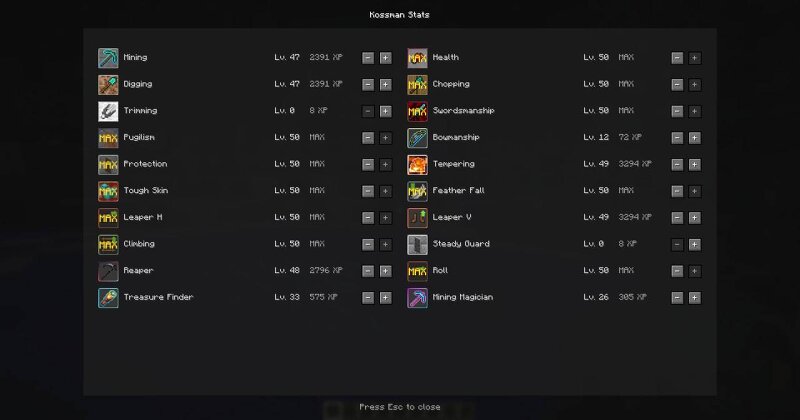
Kossman Stats is a modern rework of GokiStats, bringing persistent character progression to modern Minecraft. Upgrade stats using XP to improve gathering, combat, defense, movement, survival, and loot-related abilities. * Up to 50 levels per stat * Persistent per-player progression * Stat downgrades with a 70% XP refund * Partial stat loss on death * Mining, digging, chopping, and trimming progression * Swordsmanship, bowmanship, and pugilism * Defensive, survival, and movement stats * Treasure Finder and Mining Magician mechanics * Configurable balance and gameplay settings * Custom stat interface with inactive, active, and max-level states This is the first port-focused release. Future updates will introduce more Kossman Stats-specific mechanics, balance changes, UI improvements, and support for additional loaders. **Credits:** InfinityStudio - Original GokiStats [ github.com/InfinityStudio/GokiStats](https://github.com/InfinityStudio/GokiStats) **Source:** [ github.com/Dangeroni-Labs/kossmanstats](https://github.com/Dangeroni-Labs/kossmanstats) **License:** GPL-3.0
Added value
What’s included on this page
Preview, categories, compatibility, and tools on this page — not a bare file mirror.
- Creator
- dangeroni
- Source
- Minecraft downloads library on Eaglercraft Studio
- Type
- Minecraft mod
- Price
- Free download on Eaglercraft Studio
- Curation
- Listed with credit to dangeroni · studio preview & install guide
- Game Version
- Minecraft 26.2
- Compatible with
- Minecraft Java (match version / loader in facts)
- Tags
- Other, Qol, Utility
Install guide
How to install this free Minecraft mod
Eaglercraft Studio listing with metadata, creator credit, and loader-aware install guidance.
- 1Download the jar/zip when available.
- 2Install the matching loader (Forge, Fabric, or NeoForge) for your Minecraft version.
- 3Drop the mod into your mods folder, then launch with that profile.
Wrong loader or game version usually crashes on startup — read the facts on this page first.
Related free mods
More curated mods from the same library section.

Pastelmooncrafting15 · 67 diamonds · 20 views

PotatoWolfie · 60 diamonds · 2 views

PotatoWolfie · 53 diamonds · 622 views

Janss_33PL · 47 diamonds · 940 views