
Krylix
Creator: eliasnvx · 2026-07-14 · Mods · Free on Eaglercraft Studio
Download Krylix — free Minecraft mod. Created by eliasnvx. Tagged kill, kotlin, leaderboard, pvp. Check the file details for Forge, Fabric, or NeoForge before installing.
Creator notes
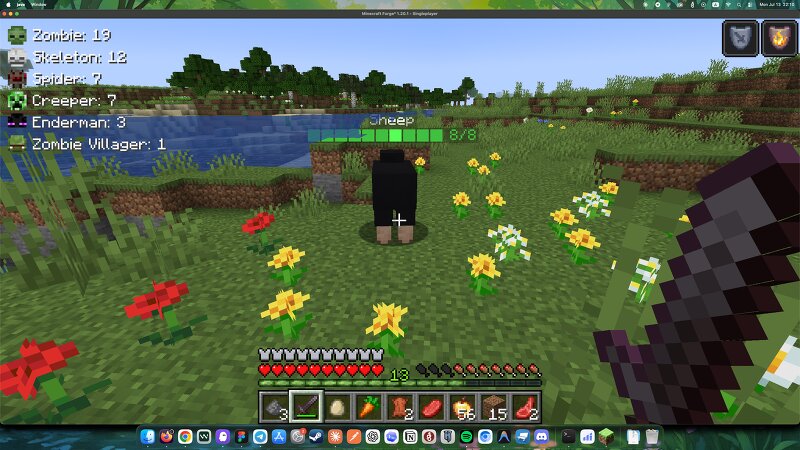
Krylix - Kill Feed, PvP Stats & Leaderboard What is Krylix? Krylix is a client-side kill feed and PvP tracking mod for Minecraft Forge. It shows every kill in real time with player and mob heads, weapon icons, and a health readout, tracks hostile-mob kills for your world, gives you a crosshair health indicator, and adds a real in-game leaderboard screen for both PvP and mob-kill rankings — all fully configurable and translated into 13 languages. Perfect for: PvP Servers - track kills in real time and see who's on top Survival Servers - monitor mob kills across the world Content Creators - a clean, professional kill feed for streams Any server - works out of the box, no setup required Kill Feed Display Real player skins - shows actual player heads with correct textures 27 verified mob head textures, checked against the real game files (not guessed) Animated weapon icons with smooth bobbing Health display - see the killer's remaining HP Distance tracking for each kill Smooth fade-out after a configurable display time Clean, non-intrusive placement, no background clutter Mob Kill Stats Panel A small panel tracking how many of each hostile mob you've killed in the current world. Persis
Added value
What’s included on this page
Preview, categories, compatibility, and tools on this page — not a bare file mirror.
- Creator
- eliasnvx
- Source
- Minecraft downloads library on Eaglercraft Studio
- Type
- Minecraft mod
- Price
- Free download on Eaglercraft Studio
- Curation
- Listed with credit to eliasnvx · studio preview & install guide
- Game Version
- Minecraft 1.20
- Compatible with
- Minecraft Java (match version / loader in facts)
- Tags
- Kill, Kotlin, Leaderboard, Pvp, Server
Install guide
How to install this free Minecraft mod
Eaglercraft Studio listing with metadata, creator credit, and loader-aware install guidance.
- 1Download the jar/zip when available.
- 2Install the matching loader (Forge, Fabric, or NeoForge) for your Minecraft version.
- 3Drop the mod into your mods folder, then launch with that profile.
Wrong loader or game version usually crashes on startup — read the facts on this page first.
Related free mods
More curated mods from the same library section.

Pastelmooncrafting15 · 67 diamonds · 20 views

PotatoWolfie · 60 diamonds · 2 views

PotatoWolfie · 53 diamonds · 622 views

Janss_33PL · 47 diamonds · 940 views