
KS Biomes
Creator: nugrevan · 2026-01-19 · Mods · Free on Eaglercraft Studio
Download KS Biomes — free Minecraft mod. Created by nugrevan. Tagged aesthetic, biome, biomes, cavern. Check the file details for Forge, Fabric, or NeoForge before installing.
Creator notes
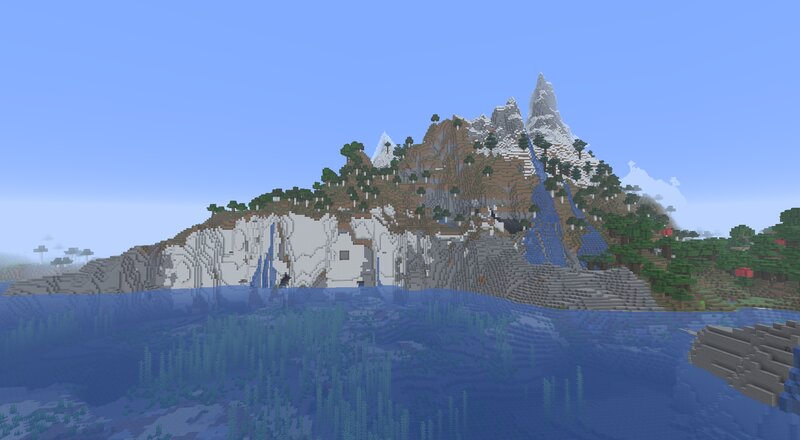
This datapack add 5 new biomes to minecraft (more are planned) : - The Calcite Cliff This biome will appear when a cliff is above an ocean, making this amazing looking calcite cliff. - The Coral Graveyard This rare biome is a variation of the warm ocean, it will generate a dying coral reef, with only a few blocks of living coral left. - The Fungal Cavern Generating where the humidity is high, this new biome is very common in the underground, the ground is covered by mycelium and mushrooms, some of them have grown into huge mushrooms that can emit light. Due to the light of the mushrooms, this biome is safer than most of the underground. Also mycelium won't generate when ores are placed, so this biome is perfectly viable for cave mining. - The Burning Dark The first variation of the deep dark, this deadly biome have a lot of magma patches, but is really rare, this biome only generate where deep dark would have generated so it won't add more overall sculk to the underground. - The Frozen Dark The second variation of the deep dark, this biome is filled with ice, replacing deepslate everywhere, and like the burning dark, this biome only generate where deep dark would have generated so
Added value
What’s included on this page
Preview, categories, compatibility, and tools on this page — not a bare file mirror.
- Creator
- nugrevan
- Source
- Minecraft downloads library on Eaglercraft Studio
- Type
- Minecraft mod
- Price
- Free download on Eaglercraft Studio
- Curation
- Listed with credit to nugrevan · studio preview & install guide
- Game Version
- Minecraft 26.1
- Compatible with
- Minecraft Java (match version / loader in facts)
- Tags
- Aesthetic, Biome, Biomes, Cavern, Caves, Cliff
Install guide
How to install this free Minecraft mod
Eaglercraft Studio listing with metadata, creator credit, and loader-aware install guidance.
- 1Download the jar/zip when available.
- 2Install the matching loader (Forge, Fabric, or NeoForge) for your Minecraft version.
- 3Drop the mod into your mods folder, then launch with that profile.
Wrong loader or game version usually crashes on startup — read the facts on this page first.
Related free mods
More curated mods from the same library section.

Pastelmooncrafting15 · 67 diamonds · 20 views

PotatoWolfie · 60 diamonds · 2 views

PotatoWolfie · 53 diamonds · 622 views

Janss_33PL · 47 diamonds · 940 views