
Liminal Archives
Creator: kyxzi · 2026-05-05 · Mods · Free on Eaglercraft Studio
Download Liminal Archives — free Minecraft mod. Created by kyxzi. Tagged aesthetic, aventure, dimension, exploration. Check the file details for Forge, Fabric, or NeoForge before installing.
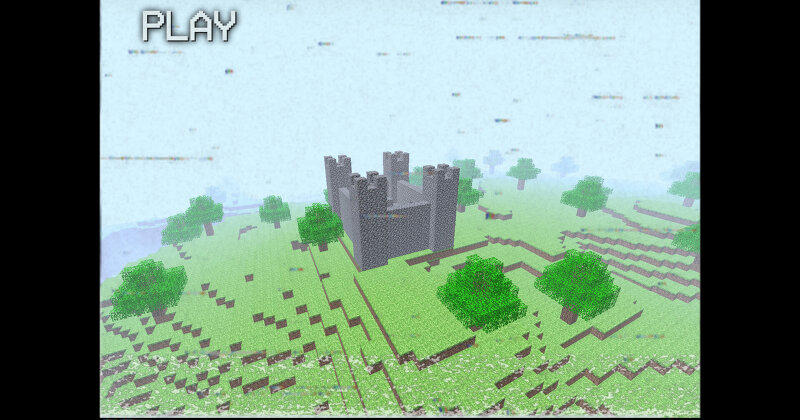
Creator notes
Liminal Archives is an exploration focused Minecraft mod that transports players into a series of eerie, dreamlike dimensions inspired by the unsettling nostalgia of Minecraft Alpha and the mysterious atmosphere of wonderland.jar. This mod is not about survival or progression as you know it. It's about curiosity, isolation, and the feeling that something isn’t quite right. Hidden deep within the Overworld lies an abandoned laboratory, lost to time. Inside, an old computer hums faintly, still operational. Interacting with it will open the gateway to the first liminal dimension. A place that feels both familiar and deeply wrong. From there, other dimensions can be discovered, each more surreal and unsettling than the last. The mod features: 6 unique liminal dimensions , each with its own atmosphere and secrets 4 new ores , scattered across these strange worlds A wide variety of blocks , designed to enhance the uncanny, nostalgic aesthetic Non-linear exploration , where progression is driven by discovery rather than direction Every dimension tells a story without words. Empty spaces stretch endlessly. Structures feel abandoned, yet not entirely lifeless. You are alone—but it doesn’t a
Added value
What’s included on this page
Preview, categories, compatibility, and tools on this page — not a bare file mirror.
- Creator
- kyxzi
- Source
- Minecraft downloads library on Eaglercraft Studio
- Type
- Minecraft mod
- Price
- Free download on Eaglercraft Studio
- Curation
- Listed with credit to kyxzi · studio preview & install guide
- Game Version
- Minecraft 1.21.8
- Compatible with
- Minecraft Java (match version / loader in facts)
- Tags
- Aesthetic, Aventure, Dimension, Exploration, Liminal, Minecraft Alpha
Install guide
How to install this free Minecraft mod
Eaglercraft Studio listing with metadata, creator credit, and loader-aware install guidance.
- 1Download the jar/zip when available.
- 2Install the matching loader (Forge, Fabric, or NeoForge) for your Minecraft version.
- 3Drop the mod into your mods folder, then launch with that profile.
Wrong loader or game version usually crashes on startup — read the facts on this page first.
Related free mods
More curated mods from the same library section.

Pastelmooncrafting15 · 67 diamonds · 20 views

PotatoWolfie · 60 diamonds · 2 views

PotatoWolfie · 53 diamonds · 622 views

Janss_33PL · 47 diamonds · 940 views