
Litematica Tool
Creator: FinnDog_123 · 2026-09-28 · Mods · Free on Eaglercraft Studio
Download Litematica Tool — free Minecraft mod. Created by FinnDog_123. Tagged building, fabric, forge, functional. Check the file details for Forge, Fabric, or NeoForge before installing.
Creator notes
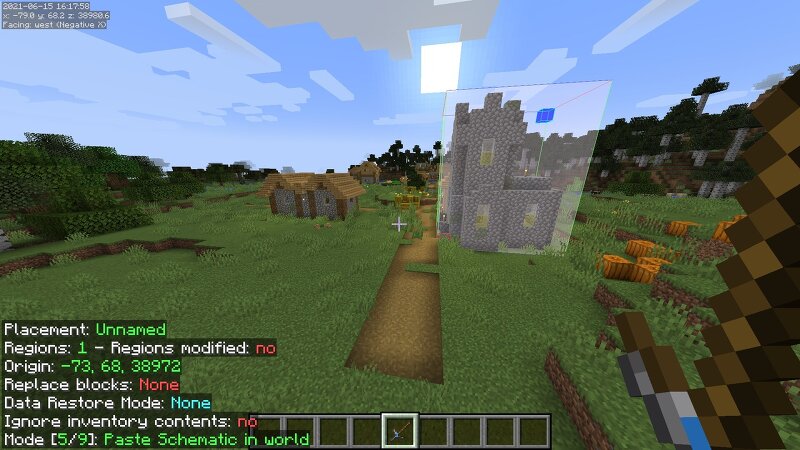
Litematica Tool Overview Please comment any ideas you may have to improve this mod. Forge version now available for 1.16 (only 1.16 due to litematica forge only being for 1.16) forge here This mod adds another item into the game (the litematica tool) which can be used with litematica instead of the stick. This mod requires litematica : link I made this mod because I found it annoying that every time I had a stick in my hand for example, if I was crafting fences, I wouldn't be able to click on the crafting table. This is a small issue that can get really irritating over time, so in my opinion, this mod is a must-have that I use every time I download litematica. HOW TO USE: First, you will need to open the litematica menu by pressing "M" Then click on the "configuration menu" button on the "generic" tab, Search "tool" then replace "minecraft:stick" with"litematicatool:the_stick" Now you can just exit out and your chosen tool for litematica will be the litematica tool. HOW TO CRAFT: put a stick in the bottom left and any plank on the top right in a two by two crafting grid. G33kt3ch A good modpack including Litematica and this mod (please say that FlyingDog_123 sent you): G33kt3ch's s
Added value
What’s included on this page
Preview, categories, compatibility, and tools on this page — not a bare file mirror.
- Creator
- FinnDog_123
- Source
- Minecraft downloads library on Eaglercraft Studio
- Type
- Minecraft mod
- Price
- Free download on Eaglercraft Studio
- Curation
- Listed with credit to FinnDog_123 · studio preview & install guide
- Game Version
- Minecraft 1.21.11
- Compatible with
- Minecraft Java (match version / loader in facts)
- Tags
- Building, Fabric, Forge, Functional, Litematica, Neoforge
Install guide
How to install this free Minecraft mod
Eaglercraft Studio listing with metadata, creator credit, and loader-aware install guidance.
- 1Download the jar/zip when available.
- 2Install the matching loader (Forge, Fabric, or NeoForge) for your Minecraft version.
- 3Drop the mod into your mods folder, then launch with that profile.
Wrong loader or game version usually crashes on startup — read the facts on this page first.
Related free mods
More curated mods from the same library section.

Pastelmooncrafting15 · 67 diamonds · 20 views

PotatoWolfie · 60 diamonds · 2 views

PotatoWolfie · 53 diamonds · 622 views

Janss_33PL · 47 diamonds · 940 views