
LK: Shop and Market 1.20.1 Forge
Creator: Nek4s · 2026-08-18 · Mods · Free on Eaglercraft Studio
Download LK: Shop and Market 1.20.1 Forge — free Minecraft mod. Created by Nek4s. Tagged server. Check the file details for Forge, Fabric, or NeoForge before installing.
Creator notes
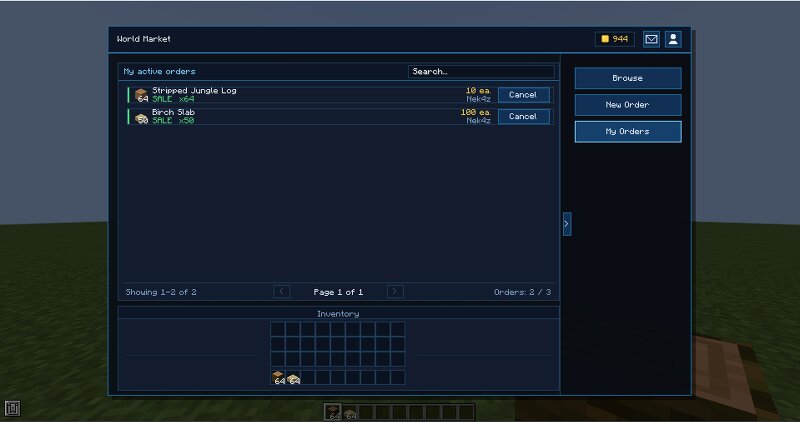
Curseforge www.curseforge.com/minecraft/mc-mods/lk-shop-market 🇬🇧 **ENGLISH** # 🏪 LK Shop&Market A player-run marketplace for Minecraft, based on how trading works in Albion Online. Open it with `/market`. **Version 0.1.0.** First public release. It works, but back up your world before putting it on a live server. ## Two markets in one mod **The World Market** is player-to-player. List an item for sale or post a buy order, and the server holds the goods and the coins until someone matches it — so you get paid while you're offline. Partial fills work too: list 300 iron, someone buys 20, the other 280 stay up. Every listing shows the market average next to it, there's a short undo window after posting, and purchases land in a mailbox so nothing gets lost if your inventory is full. **Server Shops** are admin-run, with fixed catalogs instead of an open order book. Good for a starter shop, a spawn market, or selling things you don't want players flipping to each other. ## Setting up a server shop 1. `/market admin shop create <id>` — creates the shop. 2. `/market admin entry add <shop> <buy_price> <sell_price>` — holding the item, adds it to the catalog. 3. `/market admin shop linker <s
Added value
What’s included on this page
Preview, categories, compatibility, and tools on this page — not a bare file mirror.
- Creator
- Nek4s
- Source
- Minecraft downloads library on Eaglercraft Studio
- Type
- Minecraft mod
- Price
- Free download on Eaglercraft Studio
- Curation
- Listed with credit to Nek4s · studio preview & install guide
- Game Version
- Minecraft 1.20.1
- Compatible with
- Minecraft Java (match version / loader in facts)
- Tags
- Server
Install guide
How to install this free Minecraft mod
Eaglercraft Studio listing with metadata, creator credit, and loader-aware install guidance.
- 1Download the jar/zip when available.
- 2Install the matching loader (Forge, Fabric, or NeoForge) for your Minecraft version.
- 3Drop the mod into your mods folder, then launch with that profile.
Wrong loader or game version usually crashes on startup — read the facts on this page first.
Related free mods
More curated mods from the same library section.

Pastelmooncrafting15 · 67 diamonds · 20 views

PotatoWolfie · 60 diamonds · 2 views

PotatoWolfie · 53 diamonds · 622 views

Janss_33PL · 47 diamonds · 940 views