
Lootin Remastered
Creator: DerexXD · 2026-06-15 · Mods · Free on Eaglercraft Studio
Download Lootin Remastered — free Minecraft mod. Created by DerexXD. Tagged bukkit, chests, container, derexxd. Check the file details for Forge, Fabric, or NeoForge before installing.
Creator notes
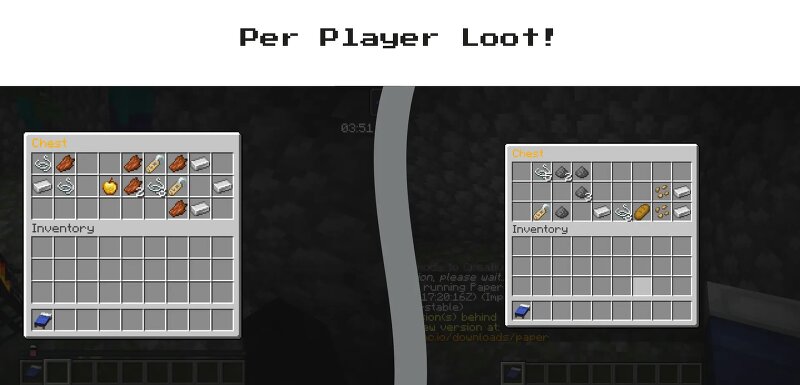
Per Player Loot Plugin for vanilla servers! Remastered version based on the original by sachingorkar102, inspired by the Forge mod Lootr. Lootin Remastered This plugin was originally created by sachingorkar102 for 1.16.5, who has permitted its posting provided that the source code remains available. This project is a revival fork of the original Lootin plugin, maintained as a continuation of the original work to provide modern version support for newer APIs, and is distributed under the original project's license . Description Per player loot, perfect for survival servers! Lootin Remastered is a Spigot/Paper plugin that ensures container loot is unique for every player on the server, similar to Lootr and JustLootit . When a player opens a naturally generated chest, barrel, or minecart, they receive their own personal loot drop, preventing structures from being cleared out by the first explorer. Features Per-Player Loot: Every naturally generated chest, barrel, or storage minecart generates independent contents per player, so no smp will ever have the problem of already-looted dungeons ever again Still Feels Vanilla: Players will open and close chests with the same sounds and animat
Added value
What’s included on this page
Preview, categories, compatibility, and tools on this page — not a bare file mirror.
- Creator
- DerexXD
- Source
- Minecraft downloads library on Eaglercraft Studio
- Type
- Minecraft mod
- Price
- Free download on Eaglercraft Studio
- Curation
- Listed with credit to DerexXD · studio preview & install guide
- Game Version
- Minecraft 26.2
- Compatible with
- Minecraft Java (match version / loader in facts)
- Tags
- Bukkit, Chests, Container, Derexxd, Loot, Lootin
Install guide
How to install this free Minecraft mod
Eaglercraft Studio listing with metadata, creator credit, and loader-aware install guidance.
- 1Download the jar/zip when available.
- 2Install the matching loader (Forge, Fabric, or NeoForge) for your Minecraft version.
- 3Drop the mod into your mods folder, then launch with that profile.
Wrong loader or game version usually crashes on startup — read the facts on this page first.
Related free mods
More curated mods from the same library section.

Pastelmooncrafting15 · 67 diamonds · 20 views

PotatoWolfie · 60 diamonds · 2 views

PotatoWolfie · 53 diamonds · 622 views

Janss_33PL · 47 diamonds · 940 views