
LootRadar
Creator: Beykus · 2026-07-21 · Mods · Free on Eaglercraft Studio
Download LootRadar — free Minecraft mod. Created by Beykus. Tagged other. Check the file details for Forge, Fabric, or NeoForge before installing.
Creator notes
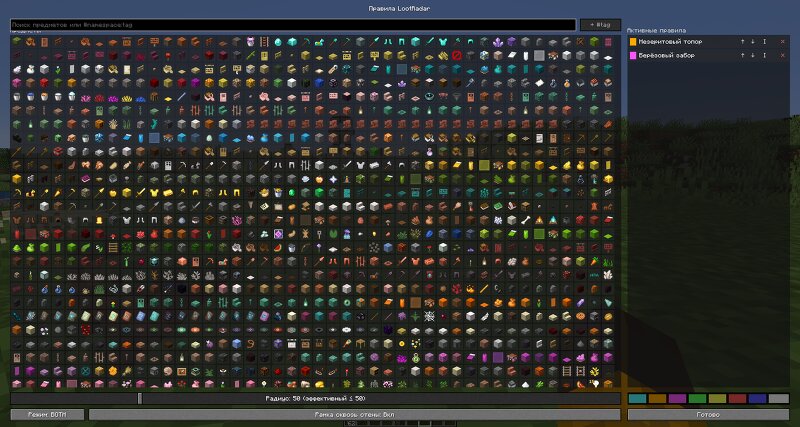
# LootRadar **Pick an item — see it glow on the ground.** LootRadar is a client-side Fabric mod that highlights dropped items you care about, so you can spot that diamond axe in a pile of junk at a glance. ## Features - **Searchable item menu** — press **Right Shift** to open a searchable grid of items and pick what to track - **Highlight rules with colors** — every rule gets its own glow color; reorder rules to decide which color wins when several match - **Item and tag matching** — track a single item (diamond axe) or a whole item tag (all swords), with configurable match modes - **Two render modes** — vanilla-style glow, a custom outline that shines through walls, or both at once - **Configurable radius** — 10–200 blocks (see the note below about the real-world limit) - **Quick-add hotkey** — look at a dropped item and press **H** to add it to your rules - **Persistent JSON config** — settings and rules survive restarts; optional **Mod Menu** integration for in-game configuration - **Client-side only** — no server installation needed, works in singleplayer and on servers ## A note about the radius LootRadar can only highlight items your client actually knows about. Servers only
Added value
What’s included on this page
Preview, categories, compatibility, and tools on this page — not a bare file mirror.
- Creator
- Beykus
- Source
- Minecraft downloads library on Eaglercraft Studio
- Type
- Minecraft mod
- Price
- Free download on Eaglercraft Studio
- Curation
- Listed with credit to Beykus · studio preview & install guide
- Game Version
- Minecraft 1.21.11
- Compatible with
- Minecraft Java (match version / loader in facts)
- Tags
- Other
Install guide
How to install this free Minecraft mod
Eaglercraft Studio listing with metadata, creator credit, and loader-aware install guidance.
- 1Download the jar/zip when available.
- 2Install the matching loader (Forge, Fabric, or NeoForge) for your Minecraft version.
- 3Drop the mod into your mods folder, then launch with that profile.
Wrong loader or game version usually crashes on startup — read the facts on this page first.
Related free mods
More curated mods from the same library section.

Pastelmooncrafting15 · 67 diamonds · 20 views

PotatoWolfie · 60 diamonds · 2 views

PotatoWolfie · 53 diamonds · 622 views

Janss_33PL · 47 diamonds · 940 views