
Lost Signal VHS v1.8.1 — Backrooms VHS & Analog Fog Fix
Creator: AlexDarkStalker · 2026-07-26 · Mods · Free on Eaglercraft Studio
Download Lost Signal VHS v1.8.1 — Backrooms VHS & Analog Fog Fix — free Minecraft mod. Created by AlexDarkStalker. Tagged aesthetic, analoghorror, backrooms, minecraftshader. Check the file details for Forge, Fabric, or NeoForge before installing.
Creator notes
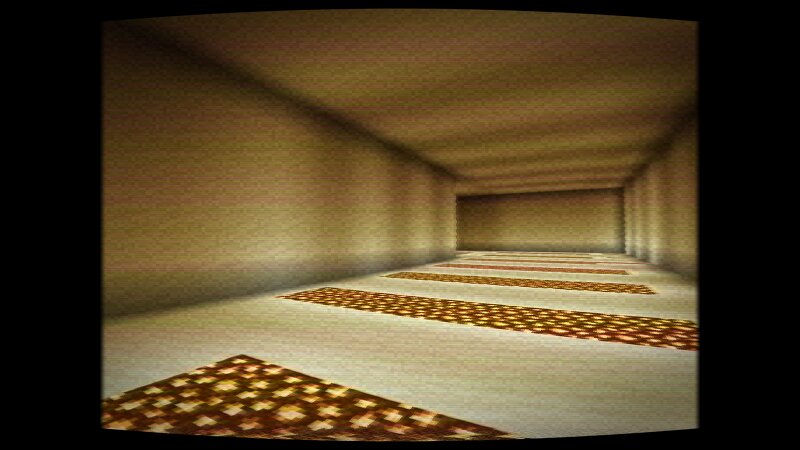
LOST SIGNAL VHS v1.8.1 — CRITICAL PACKAGING HOTFIX + ANALOG FOG CRITICAL UPDATE Versions v1.7 and v1.8 were packed with Windows-style internal ZIP paths. Iris could not see the required shaders/ directory and could reject those downloads as invalid. v1.8.1 rebuilds the archive with standard portable paths. If you downloaded v1.7 or v1.8, redownload v1.8.1. The shader code and visual features from v1.8 are unchanged. The hotfix was live verified on Minecraft 26.2 with Fabric Loader 0.19.3, Iris 1.11.2, Sodium 0.9.1, an NVIDIA RTX 5070, and OpenGL. Iris selected the pack, created the Overworld pipeline, and reloaded the Analog Fog profile without shader compile or link errors. MINECRAFT, RECORDED ON A TAPE THAT SHOULD HAVE STAYED LOST Lost Signal VHS is a free post-processing shader pack for Minecraft Java Edition. It keeps vanilla lighting and turns the final image into unstable analog found footage recorded and played back through a damaged VHS deck. BACKROOMS & ANALOG HORROR Built for Backrooms maps, Poolrooms, liminal spaces, horror modpacks, ARGs, machinima, and found-footage videos. Dedicated Backrooms, Poolrooms, Liminal Night, Found Footage, Rental Tape, Camcorder 1996, Broke
Added value
What’s included on this page
Preview, categories, compatibility, and tools on this page — not a bare file mirror.
- Creator
- AlexDarkStalker
- Source
- Minecraft downloads library on Eaglercraft Studio
- Type
- Minecraft mod
- Price
- Free download on Eaglercraft Studio
- Curation
- Listed with credit to AlexDarkStalker · studio preview & install guide
- Game Version
- Minecraft 26.2
- Compatible with
- Minecraft Java (match version / loader in facts)
- Tags
- Aesthetic, Analoghorror, Backrooms, Minecraftshader, Optifine, Vhs
Install guide
How to install this free Minecraft mod
Eaglercraft Studio listing with metadata, creator credit, and loader-aware install guidance.
- 1Download the jar/zip when available.
- 2Install the matching loader (Forge, Fabric, or NeoForge) for your Minecraft version.
- 3Drop the mod into your mods folder, then launch with that profile.
Wrong loader or game version usually crashes on startup — read the facts on this page first.
Related free mods
More curated mods from the same library section.

Pastelmooncrafting15 · 67 diamonds · 20 views

PotatoWolfie · 60 diamonds · 2 views

PotatoWolfie · 53 diamonds · 622 views

Janss_33PL · 47 diamonds · 940 views