
Mace Port (Backport Mod)
Creator: DerexXD · 2026-06-16 · Mods · Free on Eaglercraft Studio
Download Mace Port (Backport Mod) — free Minecraft mod. Created by DerexXD. Tagged adventure, armor, backport, breach. Check the file details for Forge, Fabric, or NeoForge before installing.
Creator notes
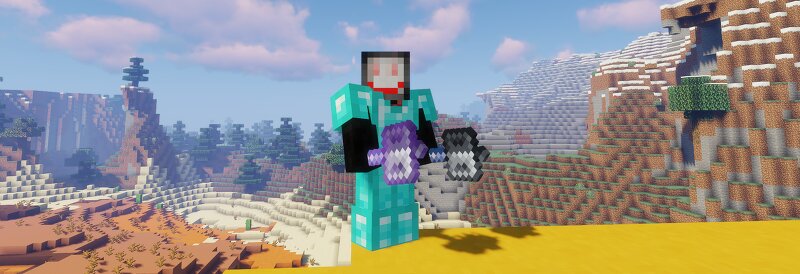
[img title= width=526 height=20] img.shields.io/badge/Forge-1.12.2 | 1.14.4 | 1.15.2 | 1.16.5 | 1.17.1 | 1.18.2 | 1.19.2 | 1.19.4 | 1.20.1 | 1.20.4-red[/img] Fabric port is now available!! Note to viewers: Y'all, don't hate on the other Mace Backport mods; they're fine mods as well and if they want to have their own changes/variants that's up to them About The recent snapshot 24w12a brought us the Mace: a melee weapon that deals additional damage the farther the player falls! Thus, I decided to program a mod that would allow previous versions to enjoy this weapon as well, falling damage cancelling, enchantments and all! Also three new enchantments! (Density, Breach, and the bouncy one) Mod comes with balanced and normal editions, check the files for more info. Vanilla Friendly Recipes 2 Fun Advancements and new Mace Enchantments! (Insert picture here) Cross-Mod Compatibility Tags forge:mace and minecraft:mace are added to allow for other mods to use the weapon from this mod Mod Showcase The amount of damage a mace can accumulate from falling is UNLIMITED allowing a single hit from a mace to kill a player wearing full Protection IV netherite armor after falling 15 blocks, and a ward
Added value
What’s included on this page
Preview, categories, compatibility, and tools on this page — not a bare file mirror.
- Creator
- DerexXD
- Source
- Minecraft downloads library on Eaglercraft Studio
- Type
- Minecraft mod
- Price
- Free download on Eaglercraft Studio
- Curation
- Listed with credit to DerexXD · studio preview & install guide
- Game Version
- Minecraft 26.1.2
- Compatible with
- Minecraft Java (match version / loader in facts)
- Tags
- Adventure, Armor, Backport, Breach, Cosmetic, Density
Install guide
How to install this free Minecraft mod
Eaglercraft Studio listing with metadata, creator credit, and loader-aware install guidance.
- 1Download the jar/zip when available.
- 2Install the matching loader (Forge, Fabric, or NeoForge) for your Minecraft version.
- 3Drop the mod into your mods folder, then launch with that profile.
Wrong loader or game version usually crashes on startup — read the facts on this page first.
Related free mods
More curated mods from the same library section.

Pastelmooncrafting15 · 67 diamonds · 20 views

PotatoWolfie · 60 diamonds · 2 views

PotatoWolfie · 53 diamonds · 622 views

Janss_33PL · 47 diamonds · 940 views