
Mario
Creator: Mystery_Montero · 2026-08-03 · Mods · Free on Eaglercraft Studio
Download Mario — free Minecraft mod. Created by Mystery_Montero. Tagged fireflower, fludd, mario, minecraft. Check the file details for Forge, Fabric, or NeoForge before installing.
Creator notes
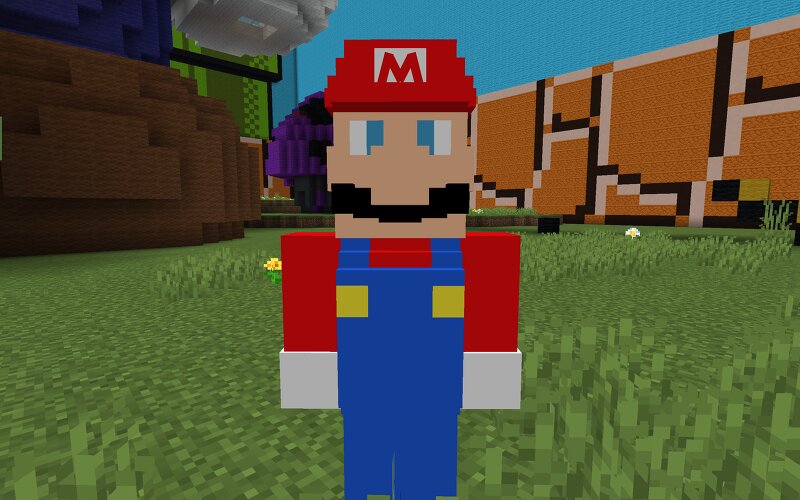
It's-A Me! Mario! Say hello to the Mario Minecraft Mod! This mod allows you to summon Mario into your world! Maro can jump, swim, and stomp on those pesky enemies! He's also got some Power-Ups to help him get the job. This originally was a capstone project for college, and now it's finally released to the public! So what are you waiting for? Let's-A Go! YAHOO! Mario has many mechanics to his disposal in this mod. In his normal state, he has three different attacks when fighting enemies. First would be melee, where Mario just fights with hand-to-hand combat. His second attack is his iconic hammer from the Mario RPG series. Mario smashes his foes with his hammer and sends them launching far in the sky. Once the hit is done, he goes into melee. The last attack is his stomp attack. If Mario can aim just right, he can jump on the enemy's head, dealing massive damage. Same with the hammer, once the attack is done, he goes into melee mode. If Mario takes enough damage, he'll turn into Small Mario, a smaller and weaker form that does less damage and can only melee attack. If Small Mario loses all his health, Mario dies permanently. This mod also comes with custom Power-Ups for Mario. There
Added value
What’s included on this page
Preview, categories, compatibility, and tools on this page — not a bare file mirror.
- Creator
- Mystery_Montero
- Source
- Minecraft downloads library on Eaglercraft Studio
- Type
- Minecraft mod
- Price
- Free download on Eaglercraft Studio
- Curation
- Listed with credit to Mystery_Montero · studio preview & install guide
- Game Version
- Minecraft 1.21
- Compatible with
- Minecraft Java (match version / loader in facts)
- Tags
- Fireflower, Fludd, Mario, Minecraft, New Content, Nintendo
Install guide
How to install this free Minecraft mod
Eaglercraft Studio listing with metadata, creator credit, and loader-aware install guidance.
- 1Download the jar/zip when available.
- 2Install the matching loader (Forge, Fabric, or NeoForge) for your Minecraft version.
- 3Drop the mod into your mods folder, then launch with that profile.
Wrong loader or game version usually crashes on startup — read the facts on this page first.
Related free mods
More curated mods from the same library section.

Pastelmooncrafting15 · 67 diamonds · 20 views

PotatoWolfie · 60 diamonds · 2 views

PotatoWolfie · 53 diamonds · 622 views

Janss_33PL · 47 diamonds · 940 views