
maze
Creator: Mine333craft · 2026-01-11 · Mods · Free on Eaglercraft Studio
Download maze — free Minecraft mod. Created by Mine333craft. Tagged maze, other. Check the file details for Forge, Fabric, or NeoForge before installing.
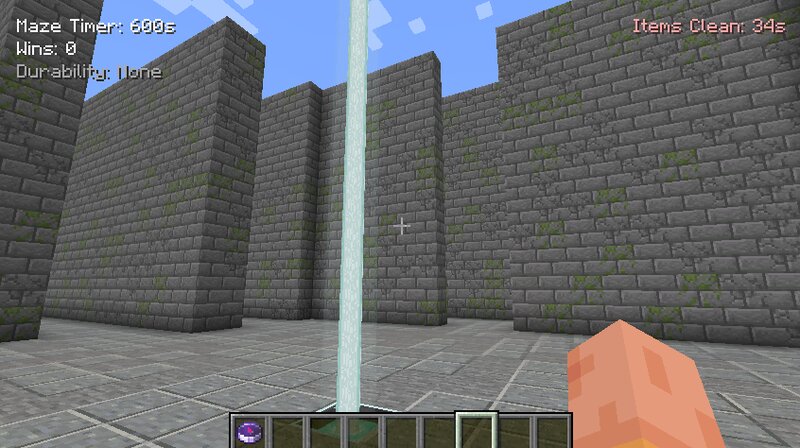
Creator notes
Maze - is an advanced Minecraft mod for creating dynamic, configurable labyrinths with timers, automatic updates, themes, Life Rooms, roof control, mob management, loot systems, and full material overrides. The mod allows you to turn any selected area into a fully functional maze that can be used as an arena, event map, minigame, or challenge. Each maze is independent, customizable, and replayable. undefined 🏗️ Main Features Generate mazes between pos1 and pos2 Automatic maze refresh when the timer reaches zero Manual refresh and full rebuild commands YAML-based theme system (maze_themes.yml) Optional roof (closed maze) Life Room (safe living area) Flexible exit management (1–4 exits) Chest and loot control Mob spawn control Drop cleanup system Full material override mode (P) HUD visible only inside the maze 🧱 Labyrinth Themes ( maze_themes.yml ) Themes define which blocks are used in different parts of the maze using weighted randomness. Example Theme castle: wall: STONE_BRICKS: 40 CRACKED_STONE_BRICKS: 20 MOSSY_STONE_BRICKS: 15 floor: POLISHED_ANDESITE: 20 STONE: 10 top: CHISELED_STONE_BRICKS: 3 box: STONE_BRICKS: 40 CRACKED_STONE_BRICKS: 20 MOSSY_STONE_BRICKS: 15 Theme Sections
Added value
What’s included on this page
Preview, categories, compatibility, and tools on this page — not a bare file mirror.
- Creator
- Mine333craft
- Source
- Minecraft downloads library on Eaglercraft Studio
- Type
- Minecraft mod
- Price
- Free download on Eaglercraft Studio
- Curation
- Listed with credit to Mine333craft · studio preview & install guide
- Game Version
- Minecraft 1.20.1
- Compatible with
- Minecraft Java (match version / loader in facts)
- Tags
- Maze, Other
Install guide
How to install this free Minecraft mod
Eaglercraft Studio listing with metadata, creator credit, and loader-aware install guidance.
- 1Download the jar/zip when available.
- 2Install the matching loader (Forge, Fabric, or NeoForge) for your Minecraft version.
- 3Drop the mod into your mods folder, then launch with that profile.
Wrong loader or game version usually crashes on startup — read the facts on this page first.
Related free mods
More curated mods from the same library section.

Pastelmooncrafting15 · 67 diamonds · 20 views

PotatoWolfie · 60 diamonds · 2 views

PotatoWolfie · 53 diamonds · 622 views

Janss_33PL · 47 diamonds · 940 views