
MCDOT highway signs
Creator: User6365008G · 2026-09-08 · Mods · Free on Eaglercraft Studio
Download MCDOT highway signs — free Minecraft mod. Created by User6365008G. Tagged other. Check the file details for Forge, Fabric, or NeoForge before installing.
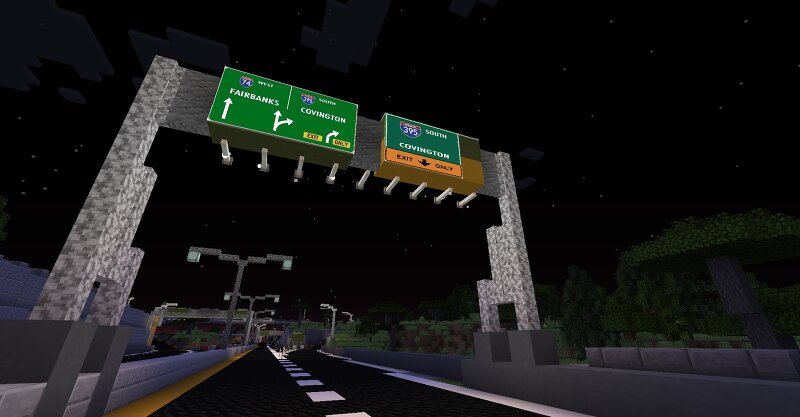
Creator notes
🚧 MCDOT ClickSigns | Minecraft Bedrock Edition Bring realistic, fully customizable overhead highway signs to your Minecraft city with MCDOT ClickSigns ! This addon adds 3D green overhead highway signs in three different sizes: small, medium, and large . Each sign can be placed separately and customized individually. ✏️ Features 🟩 Realistic 3D green highway signs 📐 Small, medium, and large sign sizes 🖱️ Interact with a sign to open the editor ⌨️ Type completely custom text 📋 Multiple lines of text 💾 Save text to each individual sign 🔒 Each sign keeps its own separate text 🔄 Saved text persists after leaving and re-entering the world 🚗 Designed for Minecraft Bedrock city/highway builds 🛣️ Perfect for custom highways, exits, destinations, and route numbers 🏙️ Example AM-23 Downtown Next Exit Another sign can have completely different text: I-475 Flint Ann Arbor No commands or predefined message lists are required. Place a sign, interact with it, enter your text, save it, and the text appears on that specific sign. Minecraft Edition: Bedrock Format: .mcaddon Creator: MCDOT.
Added value
What’s included on this page
Preview, categories, compatibility, and tools on this page — not a bare file mirror.
- Creator
- User6365008G
- Source
- Minecraft downloads library on Eaglercraft Studio
- Type
- Minecraft mod
- Price
- Free download on Eaglercraft Studio
- Curation
- Listed with credit to User6365008G · studio preview & install guide
- Game Version
- Minecraft 26.2
- Compatible with
- Minecraft Java (match version / loader in facts)
- Tags
- Other
Install guide
How to install this free Minecraft mod
Eaglercraft Studio listing with metadata, creator credit, and loader-aware install guidance.
- 1Download the jar/zip when available.
- 2Install the matching loader (Forge, Fabric, or NeoForge) for your Minecraft version.
- 3Drop the mod into your mods folder, then launch with that profile.
Wrong loader or game version usually crashes on startup — read the facts on this page first.
Related free mods
More curated mods from the same library section.

Pastelmooncrafting15 · 67 diamonds · 20 views

PotatoWolfie · 60 diamonds · 2 views

PotatoWolfie · 53 diamonds · 622 views

Janss_33PL · 47 diamonds · 940 views