
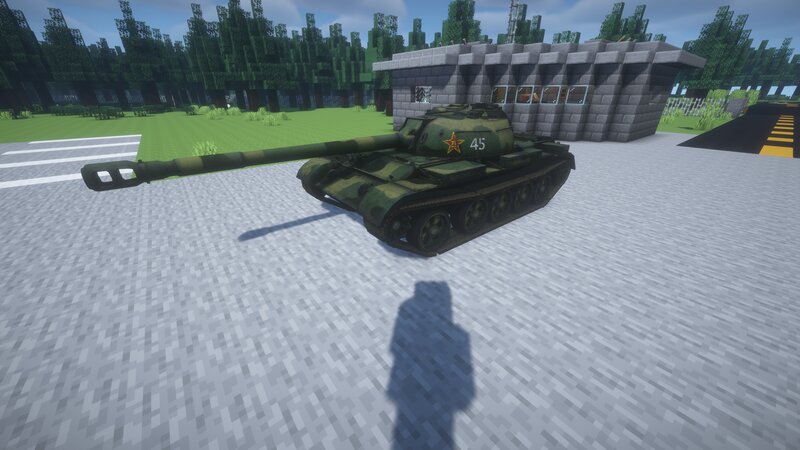
Mcheli content: T-34-3 Chinese tank
Creator: Starsclub1999 · 2025-12-17 · Mods · Free on Eaglercraft Studio
Download Mcheli content: T-34-3 Chinese tank — free Minecraft mod. Created by Starsclub1999. Tagged army, blitz, china, chinese. Check the file details for Forge, Fabric, or NeoForge before installing.
Creator notes
T-34-3 is a designation commonly used in Western sources and popular culture for a Chinese experimental medium tank , developed as a modification of the Type 59 (itself a licensed Chinese version of the Soviet T-54A). The vehicle is best known for its attempt to combine the Type 59 chassis with a large-caliber 122 mm gun , inspired by Soviet heavy tank armament. Development Background During the 1960s–1970s, China experimented with various ways to increase the firepower of its armored forces. One of these directions involved mounting heavier guns on existing medium tank platforms. The project associated with the T-34-3 designation aimed to significantly increase single-shot firepower compared to the standard 100 mm gun of the Type 59. Design Characteristics The T-34-3 concept retained the general layout of the Type 59, including its hull and suspension, while mounting a 122 mm rifled gun in a modified turret. This resulted in increased firepower but also introduced drawbacks such as: reduced rate of fire due to large ammunition limited gun depression increased recoil stress on the chassis Armor protection and mobility were generally comparable to the Type 59, with no major breakthr
Added value
What’s included on this page
Preview, categories, compatibility, and tools on this page — not a bare file mirror.
- Creator
- Starsclub1999
- Source
- Minecraft downloads library on Eaglercraft Studio
- Type
- Minecraft mod
- Price
- Free download on Eaglercraft Studio
- Curation
- Listed with credit to Starsclub1999 · studio preview & install guide
- Game Version
- Minecraft 1.7.10
- Compatible with
- Minecraft Java (match version / loader in facts)
- Tags
- Army, Blitz, China, Chinese, Cold War, Coldwar
Install guide
How to install this free Minecraft mod
Eaglercraft Studio listing with metadata, creator credit, and loader-aware install guidance.
- 1Download the jar/zip when available.
- 2Install the matching loader (Forge, Fabric, or NeoForge) for your Minecraft version.
- 3Drop the mod into your mods folder, then launch with that profile.
Wrong loader or game version usually crashes on startup — read the facts on this page first.
Related free mods
More curated mods from the same library section.

Pastelmooncrafting15 · 67 diamonds · 20 views

PotatoWolfie · 60 diamonds · 2 views

PotatoWolfie · 53 diamonds · 622 views

Janss_33PL · 47 diamonds · 940 views