
Mcheli: Su-25T
Creator: PBH · 2026-01-28 · Mods · Free on Eaglercraft Studio
Download Mcheli: Su-25T — free Minecraft mod. Created by PBH. Tagged mcheli, other. Check the file details for Forge, Fabric, or NeoForge before installing.
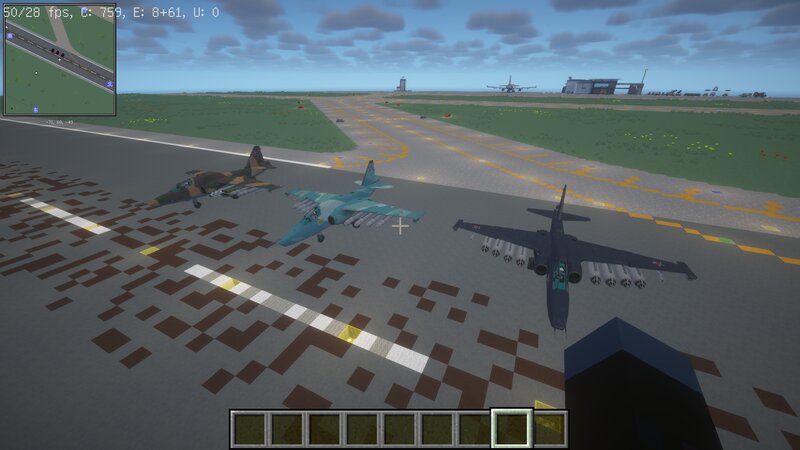
Creator notes
In the 1980s, even before the Su-25 attack aircraft began mass production, the Soviet military realized that an air support aircraft that could only perform close range air support missions during the day and had limited ability to use guided air to ground weapons would be difficult to meet the needs of future modern battlefields. The Soviet military hoped to obtain an air support aircraft that could perform missions day and night at altitudes of 30 to 4500 meters in areas 450 kilometers away from the front line of the theater. They can attack enemy mobile and fixed targets, air defense systems, helicopters, transport planes, and small ships on the surface. This military demand is seen as Russia's response to the Western proposal of being able to operate continuously day and night, attack enemy areas at the same depth and target, and accurately strike enemy second tier air support aircraft. To meet the military's requirements, Sukhoi developed the T-8M (i.e. Su-25T) program based on its proposal in the early 1980s. The first prototype Su-25T developed under the T-8M program made its maiden flight in 1984. Later, the design bureau produced eight Su-25T pre production aircraft in the
Added value
What’s included on this page
Preview, categories, compatibility, and tools on this page — not a bare file mirror.
- Creator
- PBH
- Source
- Minecraft downloads library on Eaglercraft Studio
- Type
- Minecraft mod
- Price
- Free download on Eaglercraft Studio
- Curation
- Listed with credit to PBH · studio preview & install guide
- Game Version
- Minecraft 1.7.10
- Compatible with
- Minecraft Java (match version / loader in facts)
- Tags
- Mcheli, Other
Install guide
How to install this free Minecraft mod
Eaglercraft Studio listing with metadata, creator credit, and loader-aware install guidance.
- 1Download the jar/zip when available.
- 2Install the matching loader (Forge, Fabric, or NeoForge) for your Minecraft version.
- 3Drop the mod into your mods folder, then launch with that profile.
Wrong loader or game version usually crashes on startup — read the facts on this page first.
Related free mods
More curated mods from the same library section.

Pastelmooncrafting15 · 67 diamonds · 20 views

PotatoWolfie · 60 diamonds · 2 views

PotatoWolfie · 53 diamonds · 622 views

Janss_33PL · 47 diamonds · 940 views