
MCP-rogal
Creator: R0gaL · 2026-08-16 · Mods · Free on Eaglercraft Studio
Download MCP-rogal — free Minecraft mod. Created by R0gaL. Tagged ai bot, ai integration, aibot, aiintegration. Check the file details for Forge, Fabric, or NeoForge before installing.
Creator notes
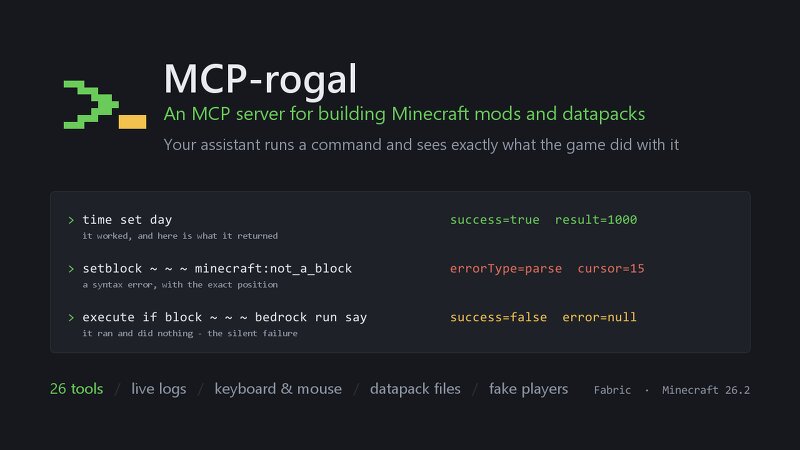
MCP-rogal An MCP server for building Minecraft mods and datapacks. Point an AI assistant at your running game and it can write a datapack, reload it, run it, read the error the game actually produced, and fix it — without you relaying anything by hand. 26 tools, Fabric, Minecraft 26.2. The idea Most of the time lost writing a datapack goes to one thing: something did not work and the game would not say why. A macro missing one $(key) aborts the whole function. /reload reports success while the pack it just tried to load failed. A trigger that was never armed looks exactly like a button that does nothing. So every command comes back with what really happened: time set day → success=true result=1000 setblock ~ ~ ~ minecraft:not_a_block → errorType=parse cursor=15 execute if block ~ ~ ~ bedrock run say → success=false error=null Three different outcomes, told apart: it worked and returned 1000; it never parsed, and here is the character where parsing stopped; it ran fine and did nothing at all. That last line is the one that matters. It is what a silent failure looks like, and it is now visible instead of indistinguishable from success. What it can do Commands and timing execute_comma
Added value
What’s included on this page
Preview, categories, compatibility, and tools on this page — not a bare file mirror.
- Creator
- R0gaL
- Source
- Minecraft downloads library on Eaglercraft Studio
- Type
- Minecraft mod
- Price
- Free download on Eaglercraft Studio
- Curation
- Listed with credit to R0gaL · studio preview & install guide
- Game Version
- Minecraft 26.2
- Compatible with
- Minecraft Java (match version / loader in facts)
- Tags
- Ai Bot, Ai Integration, Aibot, Aiintegration, Api, Automation
Install guide
How to install this free Minecraft mod
Eaglercraft Studio listing with metadata, creator credit, and loader-aware install guidance.
- 1Download the jar/zip when available.
- 2Install the matching loader (Forge, Fabric, or NeoForge) for your Minecraft version.
- 3Drop the mod into your mods folder, then launch with that profile.
Wrong loader or game version usually crashes on startup — read the facts on this page first.
Related free mods
More curated mods from the same library section.

Pastelmooncrafting15 · 67 diamonds · 20 views

PotatoWolfie · 60 diamonds · 2 views

PotatoWolfie · 53 diamonds · 622 views

Janss_33PL · 47 diamonds · 940 views