
Meiji 19 Uniform Mod
Creator: yusufikgaming · 2025-12-04 · Mods · Free on Eaglercraft Studio
Download Meiji 19 Uniform Mod — free Minecraft mod. Created by yusufikgaming. Tagged new content. Check the file details for Forge, Fabric, or NeoForge before installing.
Creator notes
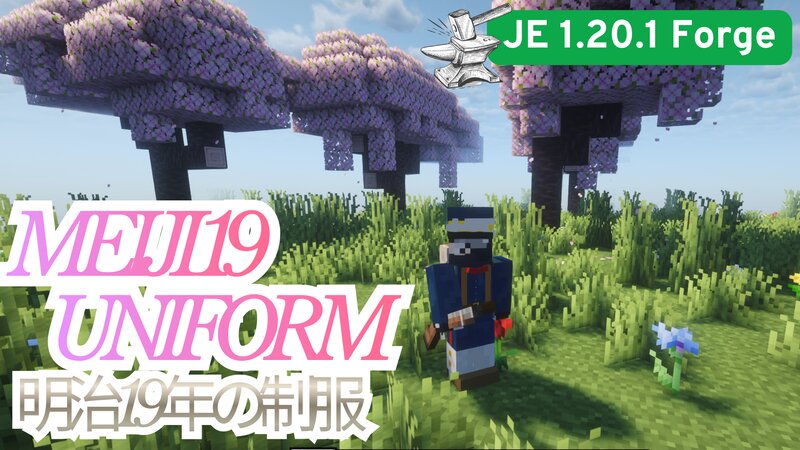
BRIEF DESCRIPTION A JE 1.20.1 Forge mod that adds 3D modelled Meiji 19 Uniform. This mod is great for Japan-themed roleplays, the reason is I never saw a mod featuring this uniform. HISTORICAL CONTEXT 1886 Meiji 19 tunic, modeled on Imperial German uniforms. This single-breasted tunic had a standing collar, no pockets at first, and was worn with matching trousers and a kepi bearing a brass star. Later, the kepi was replaced by a flat-topped cap, the collar became higher, and pockets were added for officers. Branch colors were applied to collars, shoulder straps, and trouser stripes: Infantry: red facings; yellow cap piping (red for Imperial Guard). Artillery: yellow facings. Engineers: dark brown. Medical: green. Transport: light blue. Support services: white. Full-dress included a dark-blue shako (red for the Guard) with a white plume, though a kepi-like peaked cap was typical for duty use. White cotton uniforms served in hot climates, with white trousers and cap covers worn with blue tunics. Senior officers could wear a longer double-breasted tunic with gold Austrian knots, sashes, shoulder cords, and plumes. For field and duty wear they used dark-blue dolmans with black braid, s
Added value
What’s included on this page
Preview, categories, compatibility, and tools on this page — not a bare file mirror.
- Creator
- yusufikgaming
- Source
- Minecraft downloads library on Eaglercraft Studio
- Type
- Minecraft mod
- Price
- Free download on Eaglercraft Studio
- Curation
- Listed with credit to yusufikgaming · studio preview & install guide
- Game Version
- Minecraft 1.20.1
- Compatible with
- Minecraft Java (match version / loader in facts)
- Tags
- New Content
Install guide
How to install this free Minecraft mod
Eaglercraft Studio listing with metadata, creator credit, and loader-aware install guidance.
- 1Download the jar/zip when available.
- 2Install the matching loader (Forge, Fabric, or NeoForge) for your Minecraft version.
- 3Drop the mod into your mods folder, then launch with that profile.
Wrong loader or game version usually crashes on startup — read the facts on this page first.
Related free mods
More curated mods from the same library section.

Pastelmooncrafting15 · 67 diamonds · 20 views

PotatoWolfie · 60 diamonds · 2 views

PotatoWolfie · 53 diamonds · 622 views

Janss_33PL · 47 diamonds · 940 views