
Mending Book Not Required: Repair Kit
Creator: Pawofthewild · 2026-02-01 · Mods · Free on Eaglercraft Studio
Download Mending Book Not Required: Repair Kit — free Minecraft mod. Created by Pawofthewild. Tagged 1218mod, mcreator, mcreatormod, neoforge. Check the file details for Forge, Fabric, or NeoForge before installing.
Creator notes
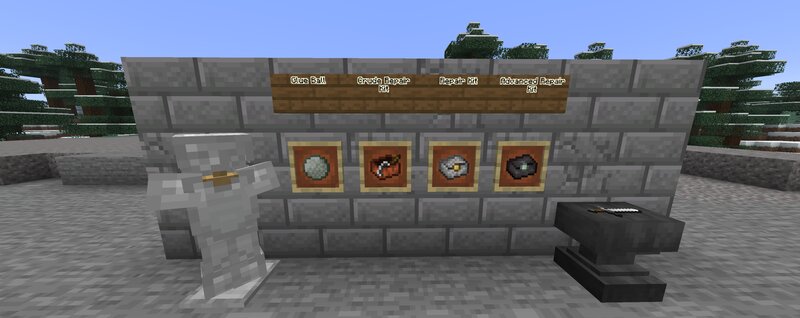
Have you ever wanted to repair your tools without needing an expensive anvil or need to go through the grinding task of obtaining an mending book? Well this is the mod for you as it adds a new repairing material, and three tier of repair kits. To start repairing your tools and armor, you need to obtain a Glue Ball, which is made of two of Bonemeal and Slime Balls. You can either use it as a way to repair your tools and armor, or you can use it in the new repair kits. There are three tiers of repair kits. The first is the Crude Repair Kit, the second is the Repair Kit, and the third and final repair kit is the Advanced Repair Kit, which now needs Duct Tape, made from four Glue Ball and four Paper. Materials for Repair Kits: Crude Repair Kit: String, Glue Ball, Stick, and Leather. Repair Kit: Crude Repair Kit, two Glue Ball, Five Iron Ingot, and a Gold Ingot. Advanced Repair Kit: Repair Kit, Nether Star, Netherite Ingot, and two Glue Ball. Elytra Repair Kit: One Advanced Repair Kit plus four Duct Tape, two Phantom Membrane, and two Popped Chorus Fruit. Trident Repair Kit: One Advanced Repair Kit plus four Duct Tape. two Prismarine Shards, and two Prismarine Crystal. Turtle Helmet Rep
Added value
What’s included on this page
Preview, categories, compatibility, and tools on this page — not a bare file mirror.
- Creator
- Pawofthewild
- Source
- Minecraft downloads library on Eaglercraft Studio
- Type
- Minecraft mod
- Price
- Free download on Eaglercraft Studio
- Curation
- Listed with credit to Pawofthewild · studio preview & install guide
- Game Version
- Minecraft 1.21.8
- Compatible with
- Minecraft Java (match version / loader in facts)
- Tags
- 1218mod, Mcreator, Mcreatormod, Neoforge, Neoforgemod, New Content
Install guide
How to install this free Minecraft mod
Eaglercraft Studio listing with metadata, creator credit, and loader-aware install guidance.
- 1Download the jar/zip when available.
- 2Install the matching loader (Forge, Fabric, or NeoForge) for your Minecraft version.
- 3Drop the mod into your mods folder, then launch with that profile.
Wrong loader or game version usually crashes on startup — read the facts on this page first.
Related free mods
More curated mods from the same library section.

Pastelmooncrafting15 · 67 diamonds · 20 views

PotatoWolfie · 60 diamonds · 2 views

PotatoWolfie · 53 diamonds · 622 views

Janss_33PL · 47 diamonds · 940 views