
Messy Beds
Creator: DJayFresh · 2026-09-22 · Mods · Free on Eaglercraft Studio
Download Messy Beds — free Minecraft mod. Created by DJayFresh. Tagged bed, functional, java, messy. Check the file details for Forge, Fabric, or NeoForge before installing.
Creator notes
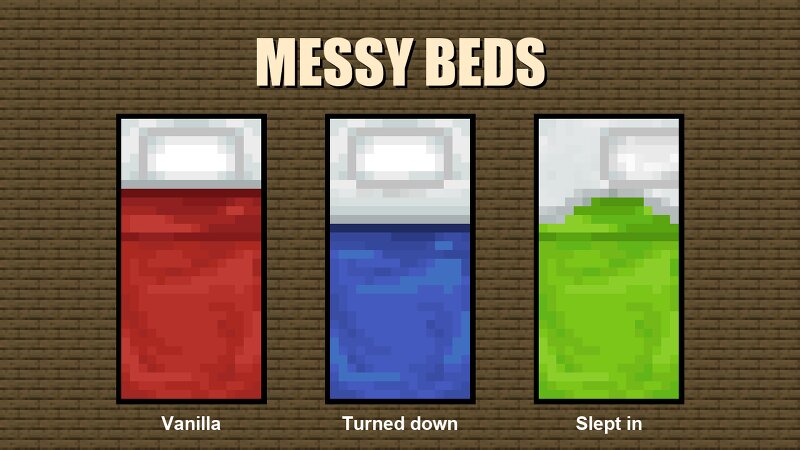
Welcome to your new bed. Kinda looks like your old one, right? Well, you'll get to loving these new beds soon enough. In fact, every bed in the world is one now: villages, igloos, camps, the one you craft, the one you dye, the one you dig out of a chest. Even worlds you started before installing get their beds swapped as you wander back through. Can't tell when to fall asleep? No more, with our turndown bed service. When the night is dark enough to sleep, the blanket is already folded back for you. Always wanted to tidy up your sheets? That's right! No more clean beds after a night of sound sleep. Wake up, admire the mess, and give it a right-click when you're ready to be a responsible adult. Villagers get the same treatment, and yes, they still find their way home. Straw beds are left alone. One night only, no housekeeping. Requires: Minecraft 26.3 and NeoForge 26.3.0.8-beta or newer. Config lets you turn off the turndown service or the bed replacement if you'd rather keep vanilla beds around.
Added value
What’s included on this page
Preview, categories, compatibility, and tools on this page — not a bare file mirror.
- Creator
- DJayFresh
- Source
- Minecraft downloads library on Eaglercraft Studio
- Type
- Minecraft mod
- Price
- Free download on Eaglercraft Studio
- Curation
- Listed with credit to DJayFresh · studio preview & install guide
- Game Version
- Minecraft 26.3 snapshot
- Compatible with
- Minecraft Java (match version / loader in facts)
- Tags
- Bed, Functional, Java, Messy, Neoforge, Sleep
Install guide
How to install this free Minecraft mod
Eaglercraft Studio listing with metadata, creator credit, and loader-aware install guidance.
- 1Download the jar/zip when available.
- 2Install the matching loader (Forge, Fabric, or NeoForge) for your Minecraft version.
- 3Drop the mod into your mods folder, then launch with that profile.
Wrong loader or game version usually crashes on startup — read the facts on this page first.
Related free mods
More curated mods from the same library section.

Pastelmooncrafting15 · 67 diamonds · 20 views

PotatoWolfie · 60 diamonds · 2 views

PotatoWolfie · 53 diamonds · 622 views

Janss_33PL · 47 diamonds · 940 views