
MineCig (Bedrock Addon)
Creator: My name is TJ · 2026-05-12 · Mods · Free on Eaglercraft Studio
Download MineCig (Bedrock Addon) — free Minecraft mod. Created by My name is TJ. Tagged 3d, addon, aurafarm, bedrock. Check the file details for Forge, Fabric, or NeoForge before installing.
Creator notes
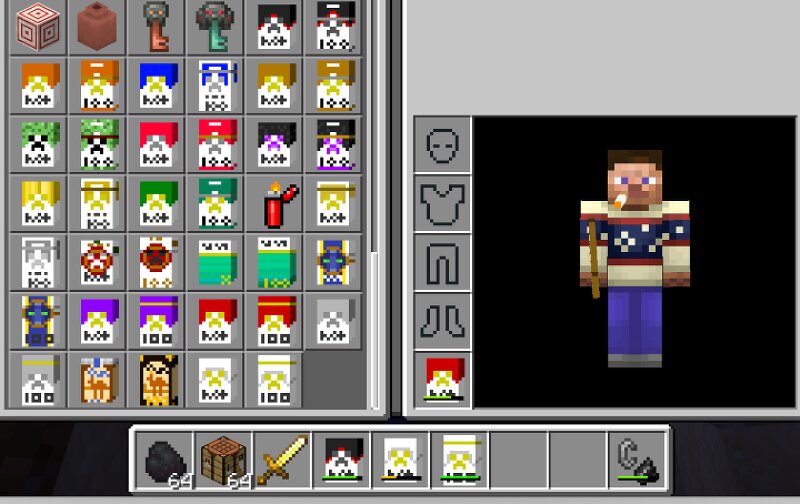
What the heck is Minecig? MineCig adds 36 craftable cigarette variants + the Cigarette Lighter to your Bedrock world. Each variant has unique status effects, self-damage values, and flammability tiers — modeled loosely after real-world brand vibes ranging from "barely a kick" Whites all the way up to "lung-busting" Blacks and Unfiltereds. Every cigarette is held at your character's lips , in 3D, in both first and third person. They smoke when lit. They flick like flaming arrows when you tap right-click. Lets you inhale buffs like a poor man's potion. And yes, you can light another player's cigarette by walking up and right-clicking them with your Lighter, because some things matter. Features 36 craftable variants in two lines Tier line (10 base + 100s = 20): Whites — The standard. Smooth, mild, forgettable. Silvers — A whisper of speed. Golds — Imported. Overpriced. Worth it? Blues — A blue-collar staple. Greens — Earthy. Possibly herbal. Reds — Strong. Confident. Smells like victory. Blacks — Black tar. Avoid before mining. Crimsons — Nether-touched. Burns hot. Purples — You'll vanish. Probably. Bronzes — Cheap and harsh. Makes you angry. Specialty line (8 base + 100s = 16): Menth
Added value
What’s included on this page
Preview, categories, compatibility, and tools on this page — not a bare file mirror.
- Creator
- My name is TJ
- Source
- Minecraft downloads library on Eaglercraft Studio
- Type
- Minecraft mod
- Price
- Free download on Eaglercraft Studio
- Curation
- Listed with credit to My name is TJ · studio preview & install guide
- Game Version
- Minecraft 26.1.1
- Compatible with
- Minecraft Java (match version / loader in facts)
- Tags
- 3d, Addon, Aurafarm, Bedrock, Cigarette, Cigarettes
Install guide
How to install this free Minecraft mod
Eaglercraft Studio listing with metadata, creator credit, and loader-aware install guidance.
- 1Download the jar/zip when available.
- 2Install the matching loader (Forge, Fabric, or NeoForge) for your Minecraft version.
- 3Drop the mod into your mods folder, then launch with that profile.
Wrong loader or game version usually crashes on startup — read the facts on this page first.
Related free mods
More curated mods from the same library section.

Pastelmooncrafting15 · 67 diamonds · 20 views

PotatoWolfie · 60 diamonds · 2 views

PotatoWolfie · 53 diamonds · 622 views

Janss_33PL · 47 diamonds · 940 views