
Minecraft, but LIFE = SIZE
Creator: Mokey Crue · 2026-09-14 · Mods · Free on Eaglercraft Studio
Download Minecraft, but LIFE = SIZE — free Minecraft mod. Created by Mokey Crue. Tagged hearts, life, minecraft, minecraftbut. Check the file details for Forge, Fabric, or NeoForge before installing.
Creator notes
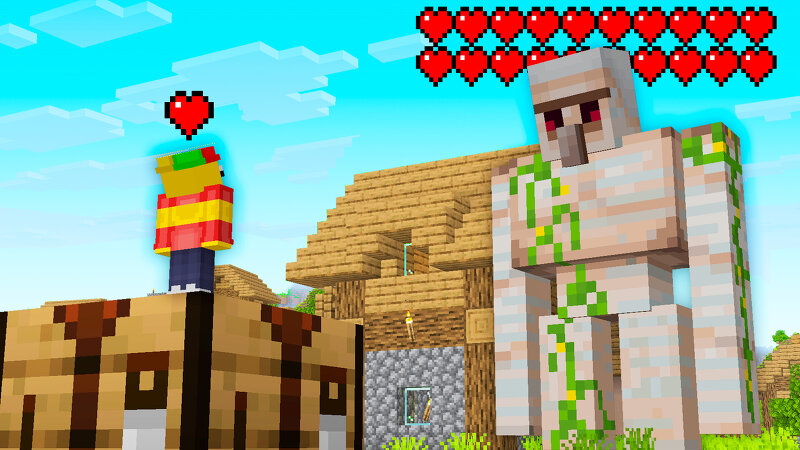
Mokey Mod: Minecraft, but LIFE = SIZE 📏 The more health you have, the bigger you get. The less health you have, the smaller you shrink. That simple — and completely chaotic in practice. Picture this: a Creeper blows you up, you lose half your health, and you literally shrink on the spot. Your friend, stacked with bonus hearts, has turned into a giant walking over blocks like they're stairs. Even mobs change size with their health — a zombie on its last legs becomes a tiny, easy target, while a full-health Ender Dragon looks noticeably more menacing. Health = Size is a mod for Minecraft 1.21.8 that turns health (HP) into a real-time visual variable for any creature — players, mobs, and even the Ender Dragon. Your health isn't just a number on a bar: it literally makes you bigger or smaller, changes your step height and your hitbox, all synced every single game tick. 🩶 How It Works Health-based scaling (real-time, every tick) Players: size is calculated as current health ÷ 20 , clamped between 0.5x (low health) and 2.0x (high bonus health). At the vanilla default of 10 hearts (20 HP) you're at normal size (1.0x); push past 20 bonus hearts and you hit the max size of 2x. Mobs in gener
Added value
What’s included on this page
Preview, categories, compatibility, and tools on this page — not a bare file mirror.
- Creator
- Mokey Crue
- Source
- Minecraft downloads library on Eaglercraft Studio
- Type
- Minecraft mod
- Price
- Free download on Eaglercraft Studio
- Curation
- Listed with credit to Mokey Crue · studio preview & install guide
- Game Version
- Minecraft 1.21.8
- Compatible with
- Minecraft Java (match version / loader in facts)
- Tags
- Hearts, Life, Minecraft, Minecraftbut, Other, Size
Install guide
How to install this free Minecraft mod
Eaglercraft Studio listing with metadata, creator credit, and loader-aware install guidance.
- 1Download the jar/zip when available.
- 2Install the matching loader (Forge, Fabric, or NeoForge) for your Minecraft version.
- 3Drop the mod into your mods folder, then launch with that profile.
Wrong loader or game version usually crashes on startup — read the facts on this page first.
Related free mods
More curated mods from the same library section.

Pastelmooncrafting15 · 67 diamonds · 20 views

PotatoWolfie · 60 diamonds · 2 views

PotatoWolfie · 53 diamonds · 622 views

Janss_33PL · 47 diamonds · 940 views