
Minecraft Music Player
Creator: Junhsiun · 2026-03-10 · Mods · Free on Eaglercraft Studio
Download Minecraft Music Player — free Minecraft mod. Created by Junhsiun. Tagged functional, music. Check the file details for Forge, Fabric, or NeoForge before installing.
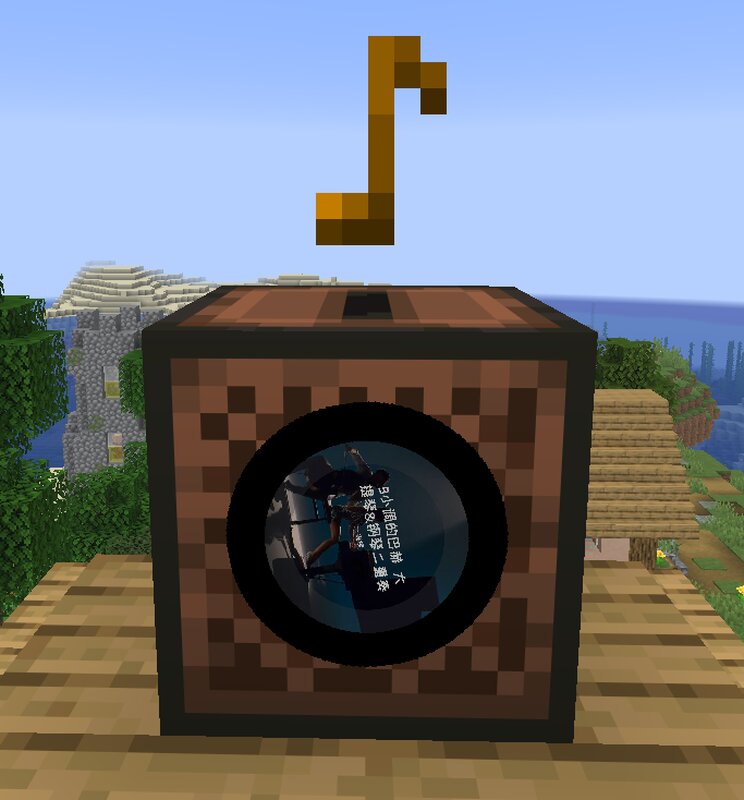
Creator notes
It provides NetEase Cloud Music search, song requests, shared queue playback, playlist playback, custom music discs, and URL-based jukebox playback. The server handles commands, queue logic, search requests, sync, random loot disc injection, and jukebox control. The client handles actual audio download, playback, and jukebox cover rendering. This is a dual-side mod, not a pure server-side audio mod. Features Search songs, artists, playlists, and users View artist top songs, playlist details, and user playlists Unified paging and clickable navigation for all major list pages Clickable actions for request, burn, detail view, and download Shared song requests, queue playback, auto-advance, and vote skip Duplicate request deduplication and move-queued-track-to-next support Server-side queue prefetching to reduce delay between tracks Burn songs into vanilla music discs and play URL-based music from jukeboxes /music random generates 10 random hot songs each time All loot-table-backed containers can spawn random hot music discs based on admin settings How It Works The server handles command execution, search requests, playback queue, loot disc generation, and jukebox synchronization The c
Added value
What’s included on this page
Preview, categories, compatibility, and tools on this page — not a bare file mirror.
- Creator
- Junhsiun
- Source
- Minecraft downloads library on Eaglercraft Studio
- Type
- Minecraft mod
- Price
- Free download on Eaglercraft Studio
- Curation
- Listed with credit to Junhsiun · studio preview & install guide
- Game Version
- Minecraft 1.21.11
- Compatible with
- Minecraft Java (match version / loader in facts)
- Tags
- Functional, Music
Install guide
How to install this free Minecraft mod
Eaglercraft Studio listing with metadata, creator credit, and loader-aware install guidance.
- 1Download the jar/zip when available.
- 2Install the matching loader (Forge, Fabric, or NeoForge) for your Minecraft version.
- 3Drop the mod into your mods folder, then launch with that profile.
Wrong loader or game version usually crashes on startup — read the facts on this page first.
Related free mods
More curated mods from the same library section.

Pastelmooncrafting15 · 67 diamonds · 20 views

PotatoWolfie · 60 diamonds · 2 views

PotatoWolfie · 53 diamonds · 622 views

Janss_33PL · 47 diamonds · 940 views