
MineGauge
Creator: minegaugedev · 2026-09-20 · Mods · Free on Eaglercraft Studio
Download MineGauge — free Minecraft mod. Created by minegaugedev. Tagged functional. Check the file details for Forge, Fabric, or NeoForge before installing.
Creator notes
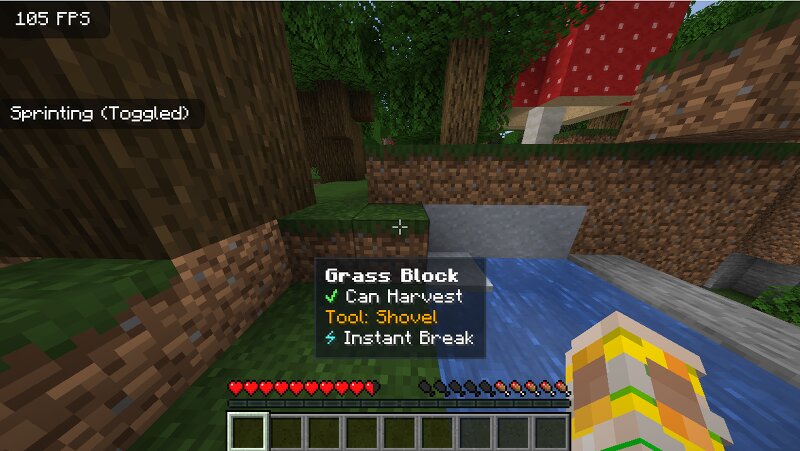
# MineGauge — Tactical Client-Side Block & Harvest Inspector > **Have you ever mined Ancient Debris with the wrong pickaxe and lost it? Wondered if your pickaxe will instamine deepslate with Haste II? Or squinted at crops wondering if they are ready?** **MineGauge** brings real-time tactical block intelligence directly into your crosshair and HUD. It is **100% client-side** and requires **zero** server-side installation or plugins. --- ### ⚡ Key Features - **🔍 Instant Harvest Check:** Clear `✔ Can Harvest` in green or `✖ Cannot Harvest (No Drops)` in red to prevent losing valuable ores and blocks. - **⛏️ Tool & Tier Detection:** Displays the exact tool type (Pickaxe, Axe, Shovel, Hoe, Sword) and the required harvest level (Stone+, Iron+, Diamond+, Netherite). - **⏱️ Exact Break Time:** Live breakdown down to seconds and game ticks (e.g. `0.45s (9 ticks)`), factoring in: - Tool tier & material base speed - Efficiency enchantments - Haste & Mining Fatigue status effects - Underwater & airborne penalties - **⚡ Insta-Mine Indicator:** Highlights when a block can be broken in a single tick (0.05s). - **🌱 Crop Maturity Tracker:** Shows exact growth stage and percentage for wheat, carrots
Added value
What’s included on this page
Preview, categories, compatibility, and tools on this page — not a bare file mirror.
- Creator
- minegaugedev
- Source
- Minecraft downloads library on Eaglercraft Studio
- Type
- Minecraft mod
- Price
- Free download on Eaglercraft Studio
- Curation
- Listed with credit to minegaugedev · studio preview & install guide
- Game Version
- Minecraft 1.21.1
- Compatible with
- Minecraft Java (match version / loader in facts)
- Tags
- Functional
Install guide
How to install this free Minecraft mod
Eaglercraft Studio listing with metadata, creator credit, and loader-aware install guidance.
- 1Download the jar/zip when available.
- 2Install the matching loader (Forge, Fabric, or NeoForge) for your Minecraft version.
- 3Drop the mod into your mods folder, then launch with that profile.
Wrong loader or game version usually crashes on startup — read the facts on this page first.
Related free mods
More curated mods from the same library section.

Pastelmooncrafting15 · 67 diamonds · 20 views

PotatoWolfie · 60 diamonds · 2 views

PotatoWolfie · 53 diamonds · 622 views

Janss_33PL · 47 diamonds · 940 views