
Mist | Realistic Shader
Creator: xsoras · 2026-07-02 · Mods · Free on Eaglercraft Studio
Download Mist | Realistic Shader — free Minecraft mod. Created by xsoras. Tagged aerialperspective, aesthetic, agx, atmosphericscattering. Check the file details for Forge, Fabric, or NeoForge before installing.
Creator notes
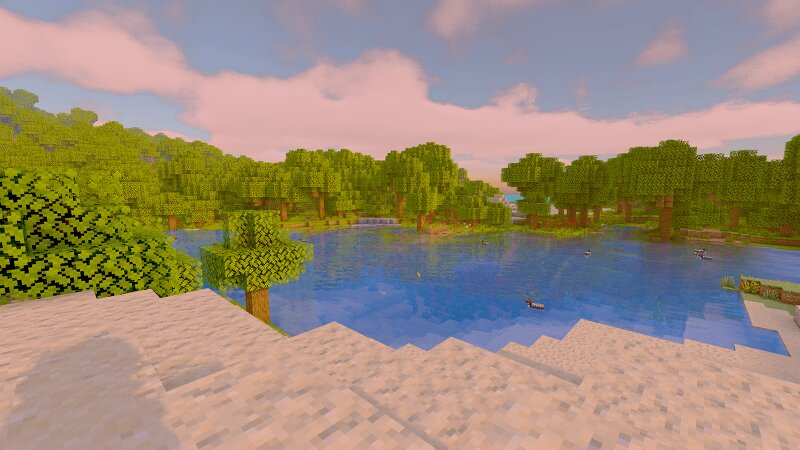
Where the light finds water. Mist is a path-inspired shaderpack built around a full deferred HDR pipeline. It started as a "Photon-style" rework and grew into its own thing: physically-motivated water, raymarched volumetric clouds, screen-space global illumination, and a genuinely cinematic underwater world. The goal throughout was restraint — every effect is grounded in how light actually behaves, tuned so the scene reads as lit rather than filtered . Nothing here is a post-processing gimmick painted over vanilla; the lighting is rebuilt from the gbuffer up. Everything runs through an RGBA16F HDR scene buffer, gets metered by an eye-adaptation pass, and lands on an AgX filmic tonemap before display. Materials are real PBR — metallic and smoothness are read from resource-pack specular maps and normals are octahedral-encoded into the gbuffer, so reflections and roughness respond per-block instead of globally. ✨ Highlights Screen-space global illumination. Instead of a flat ambient term, Mist gathers nearby lit and emissive surfaces and bleeds their color onto neighbours as one-bounce indirect light. A red-wool wall tints the floor beside it; lava and ore glow spill onto surroundin
Added value
What’s included on this page
Preview, categories, compatibility, and tools on this page — not a bare file mirror.
- Creator
- xsoras
- Source
- Minecraft downloads library on Eaglercraft Studio
- Type
- Minecraft mod
- Price
- Free download on Eaglercraft Studio
- Curation
- Listed with credit to xsoras · studio preview & install guide
- Game Version
- Minecraft 26.2
- Compatible with
- Minecraft Java (match version / loader in facts)
- Tags
- Aerialperspective, Aesthetic, Agx, Atmosphericscattering, Autoexposure, Bloom
Install guide
How to install this free Minecraft mod
Eaglercraft Studio listing with metadata, creator credit, and loader-aware install guidance.
- 1Download the jar/zip when available.
- 2Install the matching loader (Forge, Fabric, or NeoForge) for your Minecraft version.
- 3Drop the mod into your mods folder, then launch with that profile.
Wrong loader or game version usually crashes on startup — read the facts on this page first.
Related free mods
More curated mods from the same library section.

Pastelmooncrafting15 · 67 diamonds · 20 views

PotatoWolfie · 60 diamonds · 2 views

PotatoWolfie · 53 diamonds · 622 views

Janss_33PL · 47 diamonds · 940 views