
Mob Spawn Checker (MSC)
Creator: JoaoCruz · 2026-09-07 · Mods · Free on Eaglercraft Studio
Download Mob Spawn Checker (MSC) — free Minecraft mod. Created by JoaoCruz. Tagged checker, inspector, minecraft, mob. Check the file details for Forge, Fabric, or NeoForge before installing.
Creator notes
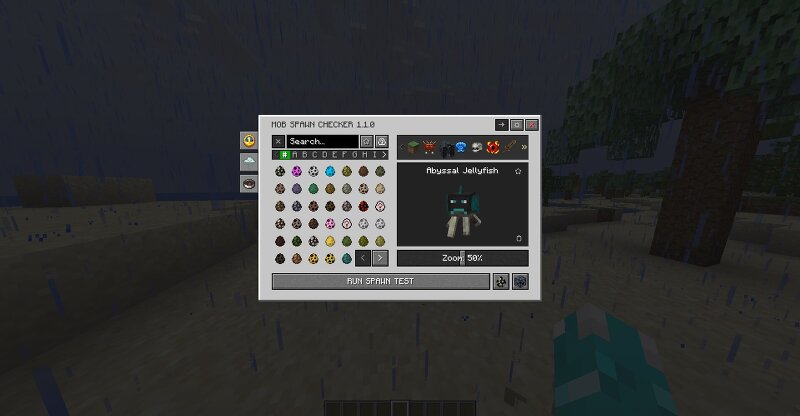
Mob Spawn Checker (MSC) is the ultimate diagnostic tool designed for mod developers and modpack creators to save hours of tedious testing. Tired of wandering around your world trying to figure out if your newly added custom mobs are actually spawning? With MSC, you can test and inspect mob spawn mechanics in real-time. Simply press H to open the mob catalog, select any mob, and run a spawn test. The mod monitors the environment for 5 seconds (for monsters) or 20 seconds (for creatures) and breaks down exactly why a mob is or isn't spawning, highlighting the exact failure step if it gets blocked. Key Features: Real-Time Spawn Testing & Diagnostics: Runs active tests to determine if a mob attempts and succeeds in spawning, utilizing an 8-door verification pipeline (Game Rules, Difficulty, Biome/Dimension, Mob Cap, Floor/Terrain, Light Level, Free Space, and World Insertion). Comprehensive Catalog & Filters: Search for mobs by their English names regardless of language, filter by favorites, view mobs without spawn eggs, or isolate mod-specific mobs. Environment Controls: Quickly toggle between Day, Night, Weather conditions, and teleport to valid biomes or dimensions right from the in
Added value
What’s included on this page
Preview, categories, compatibility, and tools on this page — not a bare file mirror.
- Creator
- JoaoCruz
- Source
- Minecraft downloads library on Eaglercraft Studio
- Type
- Minecraft mod
- Price
- Free download on Eaglercraft Studio
- Curation
- Listed with credit to JoaoCruz · studio preview & install guide
- Game Version
- Minecraft 1.20.1
- Compatible with
- Minecraft Java (match version / loader in facts)
- Tags
- Checker, Inspector, Minecraft, Mob, Msc, Program
Install guide
How to install this free Minecraft mod
Eaglercraft Studio listing with metadata, creator credit, and loader-aware install guidance.
- 1Download the jar/zip when available.
- 2Install the matching loader (Forge, Fabric, or NeoForge) for your Minecraft version.
- 3Drop the mod into your mods folder, then launch with that profile.
Wrong loader or game version usually crashes on startup — read the facts on this page first.
Related free mods
More curated mods from the same library section.

Pastelmooncrafting15 · 67 diamonds · 20 views

PotatoWolfie · 60 diamonds · 2 views

PotatoWolfie · 53 diamonds · 622 views

Janss_33PL · 47 diamonds · 940 views