
Parcours AddOn | Bedrock Edition (.mcaddon) 1.21.80+
Creator: Craft-Club · 2026-09-02 · Mods · Free on Eaglercraft Studio
Download Parcours AddOn | Bedrock Edition (.mcaddon) 1.21.80+ — free Minecraft mod. Created by Craft-Club. Tagged addon, animations, functional, minecraftbedrock. Check the file details for Forge, Fabric, or NeoForge before installing.
Creator notes
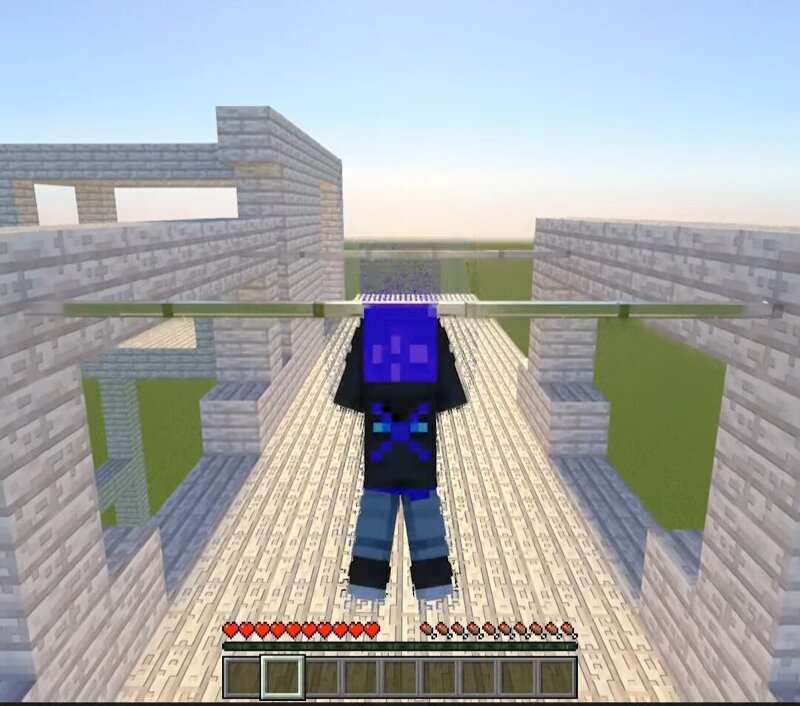
Mod Parcours Un addon Minecraft Bedrock avec animations joueur : saut, vault, vrille, salto, glissade et barre de gymnaste — plus un atelier pour habiller tes blocs. Le mod Mod Parcours ajoute des animations de parkour à Minecraft Bedrock, avec des blocs dédiés et un atelier pour les habiller. Sauter Une animation pour passer un obstacle d’un cran. Vrille et salto Des figures en l’air, à enchaîner. Saut mural Des rebonds entre deux murs. Glissade Effectuer des glissades modernes. Barre de gymnaste Accrochez-vous à une barre pour effectuer des acrobaties de gymnaste. Atelier Parkour Habiller tes blocs parkour avec des textures vanilla. Installation Abonne-toi, puis télécharge le .mcaddon et le monde. Ouvre les fichiers avec Minecraft Bedrock — les packs s’installent. Crée un monde (ou ouvre le monde fourni), puis active les packs de ressources et de comportement. Dans les expérimentations du monde, active surtout API bêta . Pour les formes des blocs custom (barre), active aussi Formes en voxels expérimentales .
Added value
What’s included on this page
Preview, categories, compatibility, and tools on this page — not a bare file mirror.
- Creator
- Craft-Club
- Source
- Minecraft downloads library on Eaglercraft Studio
- Type
- Minecraft mod
- Price
- Free download on Eaglercraft Studio
- Curation
- Listed with credit to Craft-Club · studio preview & install guide
- Game Version
- Minecraft 26.2
- Compatible with
- Minecraft Java (match version / loader in facts)
- Tags
- Addon, Animations, Functional, Minecraftbedrock, Modparcours, Other
Install guide
How to install this free Minecraft mod
Eaglercraft Studio listing with metadata, creator credit, and loader-aware install guidance.
- 1Download the jar/zip when available.
- 2Install the matching loader (Forge, Fabric, or NeoForge) for your Minecraft version.
- 3Drop the mod into your mods folder, then launch with that profile.
Wrong loader or game version usually crashes on startup — read the facts on this page first.
Related free mods
More curated mods from the same library section.

Pastelmooncrafting15 · 67 diamonds · 20 views

PotatoWolfie · 60 diamonds · 2 views

PotatoWolfie · 53 diamonds · 622 views

Janss_33PL · 47 diamonds · 940 views