
Modern Chat Tabs for Hypixel
Creator: koakumaris2 · 2026-09-08 · Mods · Free on Eaglercraft Studio
Download Modern Chat Tabs for Hypixel — free Minecraft mod. Created by koakumaris2. Tagged 189mod, chat, chatfilter, chatorganizer. Check the file details for Forge, Fabric, or NeoForge before installing.
Creator notes
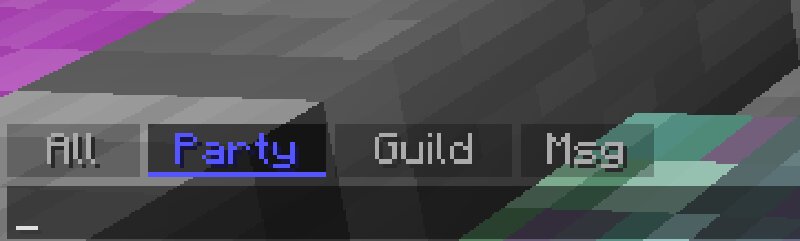
A sleek, modern client-side mod for Forge 1.8.9 that adds clickable, borderless filter tabs to your chat box, allowing you to instantly sort Party, Guild, and Private messages on Hypixel. Tired of missing important messages in a spammy lobby? Modern Chat Tabs is a lightweight, client-side Forge 1.8.9 mod designed specifically for Hypixel players. It adds intuitive, clickable chat tabs straight into your vanilla chat GUI, giving you the clean, organized feel of a premium PvP client without needing to switch launchers. Features: Instant Filtering: Instantly filter your chat to show only Party , Guild , or Private Messages with a single click. Click All to see the full chat again! Modern "Flat" UI: Say goodbye to clunky vanilla buttons. This mod features a sleek, borderless tab design with translucent backgrounds that perfectly match the vanilla chat box. Color-Coded Indicators: Tabs feature clean, glowing underlines that match Hypixel's native colors (Blue for Party, Green for Guild, Pink for Messages). Smart Chat History: Switching tabs doesn't delete your messages. The mod remembers your last 250 messages and seamlessly repopulates the chat box every time you switch filters. Typing
Added value
What’s included on this page
Preview, categories, compatibility, and tools on this page — not a bare file mirror.
- Creator
- koakumaris2
- Source
- Minecraft downloads library on Eaglercraft Studio
- Type
- Minecraft mod
- Price
- Free download on Eaglercraft Studio
- Curation
- Listed with credit to koakumaris2 · studio preview & install guide
- Game Version
- Minecraft 1.8.9
- Compatible with
- Minecraft Java (match version / loader in facts)
- Tags
- 189mod, Chat, Chatfilter, Chatorganizer, Chattabs, Chatutils
Install guide
How to install this free Minecraft mod
Eaglercraft Studio listing with metadata, creator credit, and loader-aware install guidance.
- 1Download the jar/zip when available.
- 2Install the matching loader (Forge, Fabric, or NeoForge) for your Minecraft version.
- 3Drop the mod into your mods folder, then launch with that profile.
Wrong loader or game version usually crashes on startup — read the facts on this page first.
Related free mods
More curated mods from the same library section.

Pastelmooncrafting15 · 67 diamonds · 20 views

PotatoWolfie · 60 diamonds · 2 views

PotatoWolfie · 53 diamonds · 622 views

Janss_33PL · 47 diamonds · 940 views