
Momo's Mod
Creator: Water_Wind_ · 2026-07-01 · Mods · Free on Eaglercraft Studio
Download Momo's Mod — free Minecraft mod. Created by Water_Wind_. Tagged animal, atla, avatar, cute. Check the file details for Forge, Fabric, or NeoForge before installing.
Creator notes
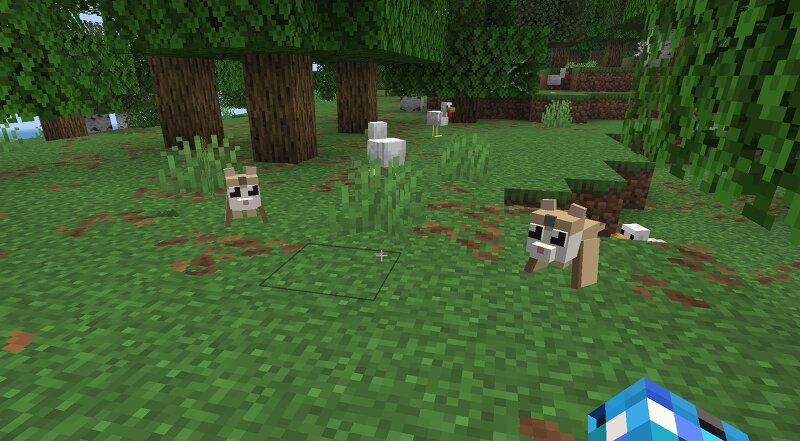
Adds Flying Lemurs to MC! Tame them, equip armor with colored gems, and explore with your loyal gliding companion. How to Use Momo's Mod Finding Lemurs Flying Lemurs spawn naturally in jungles, mountains, and occasionally across the Overworld Use a Spawn Egg (Creative tab) to spawn one manually Taming Feed a wild Flying Lemur its favorite food to tame it (Apple or Melon) Once tamed, it will follow you and roam nearby when you're standing still Armor & Gems Craft lemur armor using phantom membrane, feathers, and the corresponding material (leather, iron, gold, diamond) Equip armor by right-clicking the lemur with the armor item A colored gem appears on the lemur's forehead matching the armor type Sneak + left-click an armored lemur to remove its armor Armor tiers: Leather → Iron → Gold → Diamond → Netherite (via smithing table) Netherite armor gives the strongest regeneration Regeneration Armored lemurs passively regenerate health over time Higher-tier armor = faster regeneration (Netherite is fastest) Commands /momo here — Teleports all your tamed lemurs in the current dimension to your location - Sneak + Right click a tamed lemur to make it stop / wait Flying Lemurs glide through
Added value
What’s included on this page
Preview, categories, compatibility, and tools on this page — not a bare file mirror.
- Creator
- Water_Wind_
- Source
- Minecraft downloads library on Eaglercraft Studio
- Type
- Minecraft mod
- Price
- Free download on Eaglercraft Studio
- Curation
- Listed with credit to Water_Wind_ · studio preview & install guide
- Game Version
- Minecraft 26.2
- Compatible with
- Minecraft Java (match version / loader in facts)
- Tags
- Animal, Atla, Avatar, Cute, Mob, Momo
Install guide
How to install this free Minecraft mod
Eaglercraft Studio listing with metadata, creator credit, and loader-aware install guidance.
- 1Download the jar/zip when available.
- 2Install the matching loader (Forge, Fabric, or NeoForge) for your Minecraft version.
- 3Drop the mod into your mods folder, then launch with that profile.
Wrong loader or game version usually crashes on startup — read the facts on this page first.
Related free mods
More curated mods from the same library section.

Pastelmooncrafting15 · 67 diamonds · 20 views

PotatoWolfie · 60 diamonds · 2 views

PotatoWolfie · 53 diamonds · 622 views

Janss_33PL · 47 diamonds · 940 views