
More armor and tools mod
Creator: Gazein · 2026-09-24 · Mods · Free on Eaglercraft Studio
Download More armor and tools mod — free Minecraft mod. Created by Gazein. Tagged armor, datapack, mod, new content. Check the file details for Forge, Fabric, or NeoForge before installing.
Creator notes
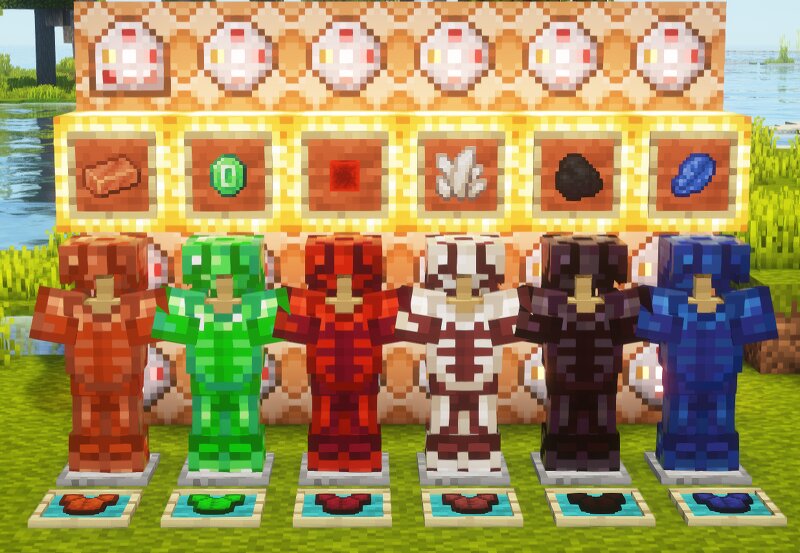
En Francais More Armor and Tools More Armor and Tools est un datapack qui étend le système d’équipement de Minecraft en ajoutant de nouvelles armures, épées et outils fabriqués à partir de matériaux déjà présents dans le jeu. Nouvelles armures Le datapack ajoute de nouveaux ensembles d’armures fabriqués avec : Résine Emeraude Quartz Redstone Lapis-lazuli Charbon Nouvelles armes et outils De nouvelles épées et de nouveaux outils sont également disponibles avec les mêmes matériaux. La houe n'est pas disponible pour ces nouveaux ensembles. Le datapack ajoute également des outils en obsidienne , qui peuvent être fabriqués à l'aide de bâtons de Blaze . More Armor and Tools More Armor and Tools is a datapack that expands Minecraft's equipment system by adding new armor sets, swords, and tools crafted from materials already found in the game. New Armor The datapack adds new armor sets made from: Resin Emerald Quartz Redstone Lapis Lazuli Coal New Weapons and Tools New swords and tools are also available using the same materials. Hoes are not available for these new equipment sets. The datapack also adds Obsidian tools , which can be crafted using Blaze Rods .
Added value
What’s included on this page
Preview, categories, compatibility, and tools on this page — not a bare file mirror.
- Creator
- Gazein
- Source
- Minecraft downloads library on Eaglercraft Studio
- Type
- Minecraft mod
- Price
- Free download on Eaglercraft Studio
- Curation
- Listed with credit to Gazein · studio preview & install guide
- Game Version
- Minecraft 26.2
- Compatible with
- Minecraft Java (match version / loader in facts)
- Tags
- Armor, Datapack, Mod, New Content, Tool, Tools
Install guide
How to install this free Minecraft mod
Eaglercraft Studio listing with metadata, creator credit, and loader-aware install guidance.
- 1Download the jar/zip when available.
- 2Install the matching loader (Forge, Fabric, or NeoForge) for your Minecraft version.
- 3Drop the mod into your mods folder, then launch with that profile.
Wrong loader or game version usually crashes on startup — read the facts on this page first.
Related free mods
More curated mods from the same library section.

Pastelmooncrafting15 · 67 diamonds · 20 views

PotatoWolfie · 60 diamonds · 2 views

PotatoWolfie · 53 diamonds · 622 views

Janss_33PL · 47 diamonds · 940 views