
More Foods+ Addon: 15 Custom Foods & Effects
Creator: merk the clerk · 2026-03-09 · Mods · Free on Eaglercraft Studio
Download More Foods+ Addon: 15 Custom Foods & Effects — free Minecraft mod. Created by merk the clerk. Tagged other. Check the file details for Forge, Fabric, or NeoForge before installing.
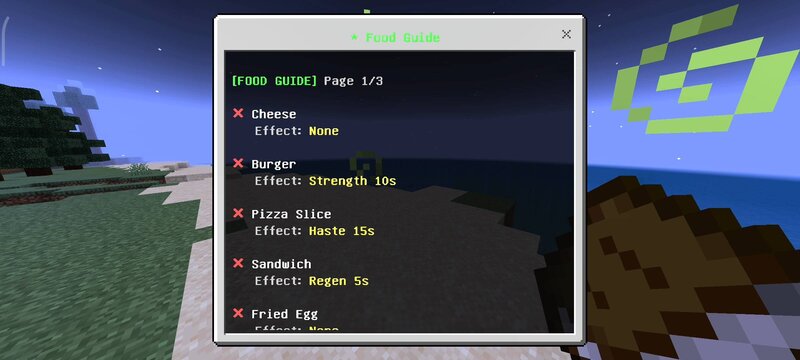
Creator notes
RR More Foods PRO v2.0.0 - The Ultimate Culinary Expansion Hey guys. Let us be completely honest about the food system in vanilla survival Minecraft. It is incredibly boring. When you first start a new world, you might eat some apples, bread, or baked potatoes. But once you set up a basic cow crusher or a villager trading hall, your diet becomes exactly the same for the rest of the game. You fill your inventory with stacks of cooked beef or golden carrots, and you never look at another food item again. Farming crops like beetroot or fishing for salmon becomes completely pointless because the game does not reward you for eating a diverse diet. It takes the fun out of building massive farms and kitchens in your survival base. I wanted to completely change how players look at food in this game. I wanted cooking and farming to actually feel rewarding and tactical. That is exactly why I created the RR More Foods PRO addon. This expansion introduces 15 highly detailed, craftable custom foods into your survival world. But these are not just basic items that fill your hunger bar; every single custom food provides specific potion effects that can give you a massive advantage in combat and e
Added value
What’s included on this page
Preview, categories, compatibility, and tools on this page — not a bare file mirror.
- Creator
- merk the clerk
- Source
- Minecraft downloads library on Eaglercraft Studio
- Type
- Minecraft mod
- Price
- Free download on Eaglercraft Studio
- Curation
- Listed with credit to merk the clerk · studio preview & install guide
- Game Version
- Minecraft 1.21.11
- Compatible with
- Minecraft Java (match version / loader in facts)
- Tags
- Other
Install guide
How to install this free Minecraft mod
Eaglercraft Studio listing with metadata, creator credit, and loader-aware install guidance.
- 1Download the jar/zip when available.
- 2Install the matching loader (Forge, Fabric, or NeoForge) for your Minecraft version.
- 3Drop the mod into your mods folder, then launch with that profile.
Wrong loader or game version usually crashes on startup — read the facts on this page first.
Related free mods
More curated mods from the same library section.

Pastelmooncrafting15 · 67 diamonds · 20 views

PotatoWolfie · 60 diamonds · 2 views

PotatoWolfie · 53 diamonds · 622 views

Janss_33PL · 47 diamonds · 940 views