
More Mob Variants Modernized
Creator: Akshaj1 · 2026-02-21 · Mods · Free on Eaglercraft Studio
Download More Mob Variants Modernized — free Minecraft mod. Created by Akshaj1. Tagged aesthetic, mobs, moremobvariants. Check the file details for Forge, Fabric, or NeoForge before installing.
Creator notes
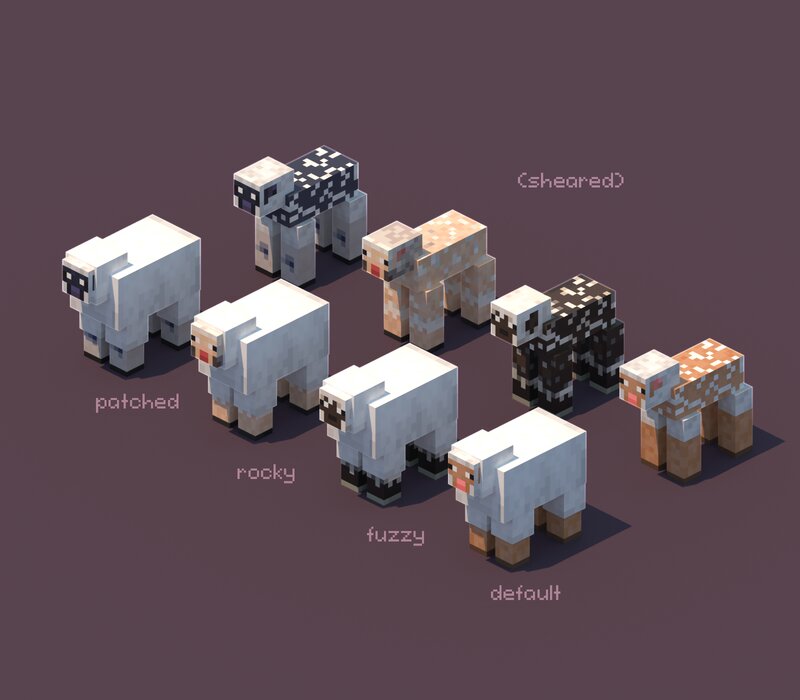
📖 About This mod adds new variants to the older mobs, even though they have gotten variants more mob variants adds even more to make them a little more fresh. Variants are added through ETF and Mojang's data driven system, meaning that they will be persistent across all players. All variants and features are data-driven and ETF-Based, allowing for full customization through resourcepacks and datapacks. For chatting, join the MoreMobVariants discord here! 💡 Installation This mod is available for Fabric and will be ported to NeoForge soon! Make sure you download the correct version. The fabric version of this mod requires Fabric API and Entity Texture Features! Get Fabric API here and Entity Texture Features here . This mod has to be installed server-side and client-side, although clients without the mod can still join servers with the mod. 📁 Features In addition to the default texture, the mod currently features the following new variants: Cat: Gray Tabby Doug Handsome Tortoiseshell Anita Hart Chicken: Amber Bronzed Gold Crested Midnight Skewbald Stormy Skeleton Duck Cow: Ashen Cookie Cream Dairy Pinto Sunset Umbra Albino Pig : Mottled Piebald Pink-Footed Sooty Spotted Sheep: Fuzzy
Added value
What’s included on this page
Preview, categories, compatibility, and tools on this page — not a bare file mirror.
- Creator
- Akshaj1
- Source
- Minecraft downloads library on Eaglercraft Studio
- Type
- Minecraft mod
- Price
- Free download on Eaglercraft Studio
- Curation
- Listed with credit to Akshaj1 · studio preview & install guide
- Game Version
- Minecraft 1.21.11
- Compatible with
- Minecraft Java (match version / loader in facts)
- Tags
- Aesthetic, Mobs, Moremobvariants
Install guide
How to install this free Minecraft mod
Eaglercraft Studio listing with metadata, creator credit, and loader-aware install guidance.
- 1Download the jar/zip when available.
- 2Install the matching loader (Forge, Fabric, or NeoForge) for your Minecraft version.
- 3Drop the mod into your mods folder, then launch with that profile.
Wrong loader or game version usually crashes on startup — read the facts on this page first.
Related free mods
More curated mods from the same library section.

Pastelmooncrafting15 · 67 diamonds · 20 views

PotatoWolfie · 60 diamonds · 2 views

PotatoWolfie · 53 diamonds · 622 views

Janss_33PL · 47 diamonds · 940 views