
MP-O-Plenty
Creator: KIrbyTristan · 2026-09-20 · Mods · Free on Eaglercraft Studio
Download MP-O-Plenty — free Minecraft mod. Created by KIrbyTristan. Tagged dirt, dirty, more stuff, new content. Check the file details for Forge, Fabric, or NeoForge before installing.
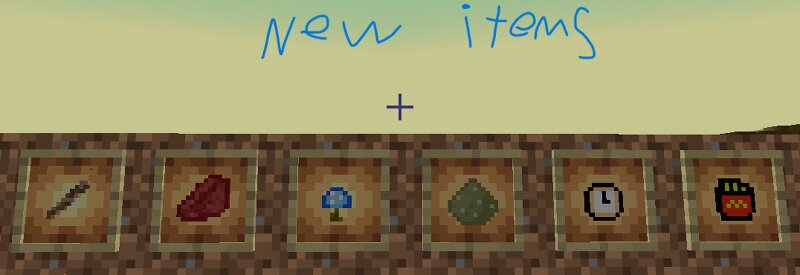
Creator notes
What MP-O-Plenty adds 🟫 Dirty materials The mod has a whole “Dirty” material set centered around Dirty Dirt and Dirty Wood . It includes: Dirty Dirt Dirty Stick Dirty Sword, Axe, Pickaxe, Shovel, and Hoe Full Dirty armor Dirty Wood logs, stripped logs, wood, planks, leaves, stairs, slabs Fences and fence gates Doors and trapdoors Pressure plates and buttons Signs and hanging signs Dirty Wood boats and chest boats There is also a Dirty Dirt Biome with custom Dirty Wood trees. 💎 Ruby A complete Ruby progression is included: Ruby Ore Ruby Block of Ruby Ruby Sword, Axe, Pickaxe, Shovel, Hoe Full Ruby armor Ruby ore is configured as a world-generated ore. 🔵 Blue Glowing Mushroom Another complete material set is based around a Blue Glowing Mushroom : Blue Glowing Mushroom Ore Blue Glowing Mushroom Block of Blue Glowing Mushroom Blue Glowing Mushroom Sword, Axe, Pickaxe, Shovel, Hoe Full Blue Glowing Mushroom armor The mod includes dedicated blue-glowing textures for the material and equipment. 🏖️ Sand Sand is treated as its own material rather than just normal Minecraft sand: Sand Ore Sand Block of Sand Sand Sword, Axe, Pickaxe, Shovel, Hoe Full Sand armor 🍟 Fries This is one of the more
Added value
What’s included on this page
Preview, categories, compatibility, and tools on this page — not a bare file mirror.
- Creator
- KIrbyTristan
- Source
- Minecraft downloads library on Eaglercraft Studio
- Type
- Minecraft mod
- Price
- Free download on Eaglercraft Studio
- Curation
- Listed with credit to KIrbyTristan · studio preview & install guide
- Game Version
- Minecraft 26.2
- Compatible with
- Minecraft Java (match version / loader in facts)
- Tags
- Dirt, Dirty, More Stuff, New Content, Plenty
Install guide
How to install this free Minecraft mod
Eaglercraft Studio listing with metadata, creator credit, and loader-aware install guidance.
- 1Download the jar/zip when available.
- 2Install the matching loader (Forge, Fabric, or NeoForge) for your Minecraft version.
- 3Drop the mod into your mods folder, then launch with that profile.
Wrong loader or game version usually crashes on startup — read the facts on this page first.
Related free mods
More curated mods from the same library section.

Pastelmooncrafting15 · 67 diamonds · 20 views

PotatoWolfie · 60 diamonds · 2 views

PotatoWolfie · 53 diamonds · 622 views

Janss_33PL · 47 diamonds · 940 views